Page Size and Overlays
You can customize your electronic output by adding paper effects and setting a common page size.
With appropriate licensing, you can include some paper effects in electronic assemblies. Paper effects that might be appropriate for the electronic output channel include the following: TOCs, overlays and cover pages.
When publishing PDF content, Calyx RIM supports the normalization of final page sizes. The page size is automatically determined based on the output paper type. For example, if the constituent documents comprise both A4 and US sized paper, and the target output is A4, the US pages are scaled to fit. Calyx RIM enables you to scale down a page to a set of standard margins to leave space for additional information you might add, for example, headers and footers.
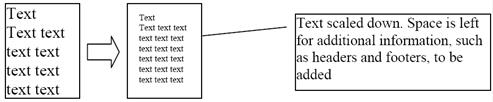
This enables you to use a single overlay for all page sizes in the publication. The overlay file can only be made smaller, so if you use this option, you must ensure that the overlay is at least as large as the largest page of your publication. For example, a US letter sized overlay applied to an A4 page will not be scaled to account for the longer dimension of the A4 page.
Overlay Handling
- Selecting Best Fit overlays will increase the time to publish due to the extra processing required for matching each page. If the page size is known, this option should be avoided.
- Before publishing to different page sizes with overlays, you must define the appropriate page sizes in your overlays and have best fit enabled. If this is not properly set up in your overlay files, you may get improper stamps; Calyx RIM requires these settings in order to choose the correct overlay to fit the output page.