TOC Entries that Target Leaf, Folder, or Document Elements
When a leaf, folder, or document that has a publishable TOC or cover page that is also assigned to be included in page numbering, the TOC entry for that leaf, folder, or document calculates the right column text for the first page of the publishable TOC or cover page. The link destination of the link under the right column TOC entry text is the first page of the publishable TOC or cover page.
When there are folders, leafs, and documents without elements attached to them (as described above), the TOC entries for those empty elements resolve to the first subsequent element in the assembly structure:
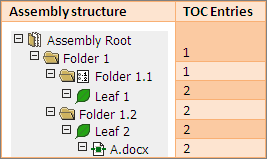
- Publishable included in page numbering TOC (see: Sample TOC 1.
- Publishable included in page numbering cover page, or (see: Sample TOC 2.
- Publishable document pages (see: Sample TOC 3.
An exception to this rule is that a paper channel cover page attached to a reference leaf is always targetable for TOC entries, even if the cover page is not included in page numbering. Electronic elements attached to a reference leaf are invalid. Tabs and Slip Sheets are never targeted because they are never included in Page Numbering.
Sample TOC 1
- All elements are in-channel and included in page numbering
- All special sheets and documents are ready to publish
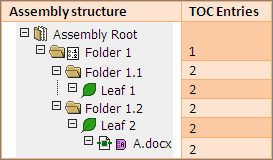
Sample TOC 2
- All elements are in-channel and included in page numbering.
- All special sheets and documents are ready to publish.
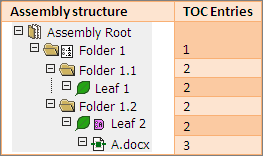
Sample TOC 3
- All elements are in-channel and included in page numbering.
- All special sheets and documents are ready to publish.