Major and Minor Divisions
Any folder in the assembly can be set as a major or minor division. These divisions can represent modules, sections, items, parts, chapters, and other standard subdivisions of a publication, depending on the type that is published. These divisions are used for page counting and to support variables such as major division name and minor division number.
There are three major and minor division variables available to access the Name, Abbreviated Name, and Number of the previous folder of each division type:
| Division name | Major division variable | Minor division variable |
|---|---|---|
| Name | $MNAME | $NNAME |
| Abbreviated Name | $MABBR | $NABBR |
| Number | $MN | $NN |
- Name = $MNAME
- Abbreviated Name = $MABBR
- Number - $MN
These major division variables ($MNAME, $MABBR, $MN) resolve the corresponding attribute of the previous folder in the tree marked as a major division. The minor division variables, $NNAME $NABBR, $NN, resolve the corresponding attribute of the previous folder in the tree marked as a minor division. Major and minor divisions do not follow parent/child hierarchy, the previous major or minor division is the next one encountered in bottom-to-top order in the navigation tree. A major division also ends the current minor division. You can control the major and minor divisions on the folder attributes.
Any folder may be set with a major or minor division, but for standard publications the first level folder should be set as a major division, and the second level folder as the minor division, for example items and sections in a legacy electronic submission.
For eCTD submissions, the first level folder is set to major division to represent the current module name and number, and each folder containing leaf elements is set to the minor division. In this way, any leaf may refer to the minor division to reference the current eCTD section.
In the following example, for a leaf in the 3 Quality folder, the minor division number $NN will be set to 3.2.P.4.1 and the major division name will always be set to Quality, as shown in this example:
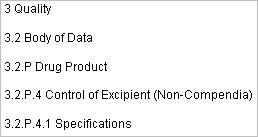
The minor division ($NN) resolves as expected, after the folder is set as minor division, and that number is then used for that element.