Conflicting Operations Rules - Synchronization with Submitted View
The following rules are applied during synchronization with Submitted view to conflicting operations.
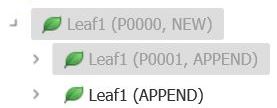
- If a leaf has
Append status in the Planned Submission and
Append status in the latest Submitted view then after synchronization the current Working View will have the following structure.
- If a leaf has
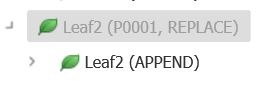
Append status in the Planned Submission and Replace status in the latest Submitted View then after synchronization the current Working View will have the following structure.
- If a leaf has
Append status in the Planned Submission and the
Delete/Withdrawn status in the latest Submitted view then after synchronization the current Working view will have the following structure.

- If a leaf has
Replace status in the Planned Submission and
Append status in the latest Submitted view then after synchronization the current Working view will have the following structure.
- If a leaf has
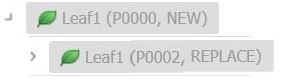
Replace status in the Planned Submission and
Replace status in the latest Submitted view then after synchronization the current Working view will have the following structure.

- If a leaf has
Replace status in the Planned Submission and
Delete/Withdrawn status in the latest Submitted view then after synchronization the current Working view will have the following structure.

- If a leaf has
Delete/Withdrawn status in the Planned Submission and
Append status in the latest Submitted view then after synchronization the current Working view will have the following structure.
- If a leaf has
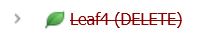
Delete/Withdrawn status in the Planned Submission and
Replace status in the latest Submitted view then after synchronization the current Working view will have the following structure.
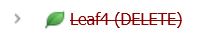
- If a leaf has
Delete/Withdrawn status in the Planned Submission and
Delete/Withdrawn status in the latest Submitted view then after synchronization the leaf in current Working view will not be displayed (the leaf is deleted from the structure).
- Consider a submission with multiple Appends to a leaf. The tree structure will be as below.
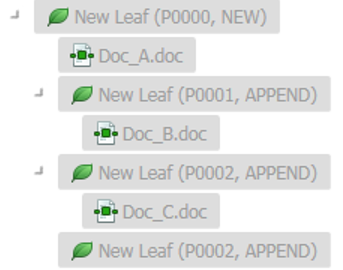
If we now apply Replace or Withdrawn operation to the initial leaf (P0000), the Replace or Withdrawn operation is applied to all the appended leaf from the last lifecycled sequence.
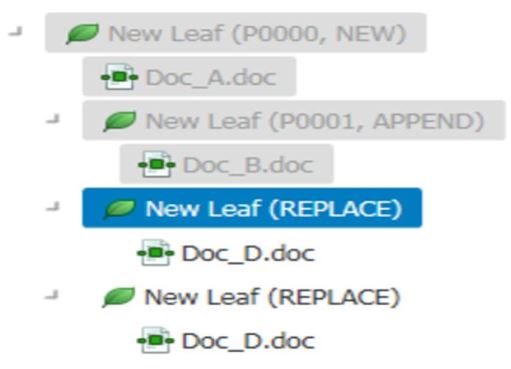
- Consider a submission with multiple Appends to a leaf. The tree structure will be as below.
After synchronization, the documents are retained in different views as per the rules noted below:
- If final operation is Append, the documents from Planned Submission are retained.
- If final operation is Replace, the documents from Planned Submission are retained.
- If final operation is Withdrawn, the documents from the Submitted view are retained.
All Workflows added to nodes in the Working view are retained. If a leaf with assigned Workflow is re-targeted to several leaves from Submitted view, a Workflow is retained for the first resulting leaf only.
Note:
- If the operation is an Append/Withdraw, all the documents from all of the sequences appear under the resulting leaf.
- It is recommended that you avoid synchronization with Submitted view for submissions that have too many changes between Working and Submitted views, as it could result in unpredictable results. For example, if we have P0001 created from P0000 and it is in Working view, and if 10 assemblies are added to lifecycle, P0001 will have to be synchronized with P0011.
- Synchronization with the Submitted View is not supported when the selected XML definitions are changed.
- Publishing Settings Library and US M1 Metadata Submitted View updates are not synchronized with the current Working View.
- Some conflicting operations, such as lifecycle operations resulting in different leaf locations in cross-specification applications, cannot be resolved by the Synchronize with the Submitted View feature. The synchronization process skips the conflicting leafs and logs the details of the leaf name and ID in the Job Requests.