You can track the changes of an assembly by multiple user groups to establish a baseline.
To view baseline differences:
-
Click a link for the assembly whose baseline differences you want to view.
-
Right-click the assembly root and choose
View Baseline Differences.
The
Compare Assemblies/Templates page opens with the baseline assembly in the
First Assembly box and the current assembly in the
Second Assembly box.
-
In the
Available Columns
box, select the columns to include in the query and move them to the
Selected Columns
box.
To remove columns from the
Selected Columns box, select them and move them to the
Available Columns box.
-
To change the order of the columns as they appear from left to right in the query results, select a column in the
Selected Columns
box and click
up or
down.
-
Click
Search.
The comparison query results are displayed.
-
To return to the
Assembly Attributes page, click
Back.
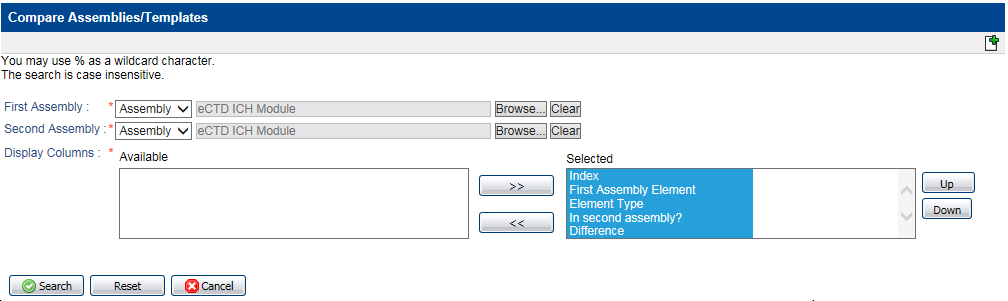 The Compare Assemblies/Templates page opens with the baseline assembly in the First Assembly box and the current assembly in the Second Assembly box.