File Synchronization Overview
Synchronization of files between , Azure and data stores
The following process shows the file synchronization between , Azure server and the data server.
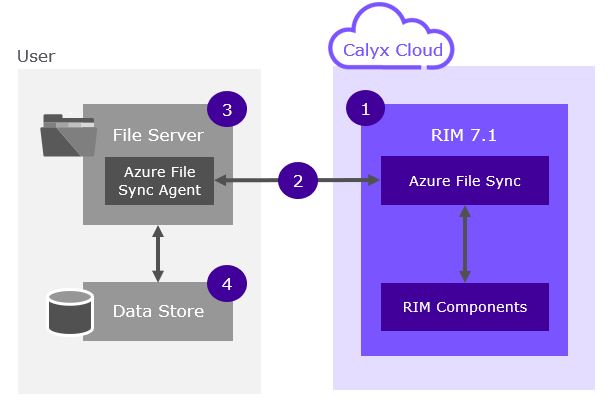
1. Storage
storage is protected by network security services in addition to Azure Defender and Azure Advanced Threat Prevention.
- Data is synced bi-directionally between and the user file server.
- Can be synced to multiple customer file servers.
- A user requires a Windows file server where the Azure File Sync Agent can be installed.
- All communications to are outbound from the agent via https (port 443).
- Agent can be placed behind a user proxy server.
- If data is stored on a non-Windows file server, the data should be directly attached to a Windows file server.
The following provides further details for file sychronization.
- All communications are HTTPS, Port 443 FileREST Protocol.
- Although files are synced both ways all connections are initiated outbound from the Customer File Sync Server to the Azure File Sync Services. No inbound ports need to be opened in the Customer environment.
- File share can only be accessed with a SAS Token. This is created when the File Sync server is set up.
- File share is protected by a storage firewall that is configured to only allow customer IP addresses to access the endpoint.
- All servers are protected with Anti-Virus/Anti-Malware software.
- All servers are monitored by our Security Operations Centre (SOC).
- All storage accounts are protected with Microsoft Defender.
- Files within the application are modified and updated by customer publishing end users via the application, there is no other external access.
- Approximately 90% of files that are sent back are PDF.
- Any files that need to be synced with will need to be copied to a folder on the customer File Sync Server.
- End users will continue to access via a URL over the internet, there is no impact on their interaction with .
- 3rd Party pen testing has been completed as part of the product release.