Product Details in a PDS
You can track details for a product detail set, based on the type of product.
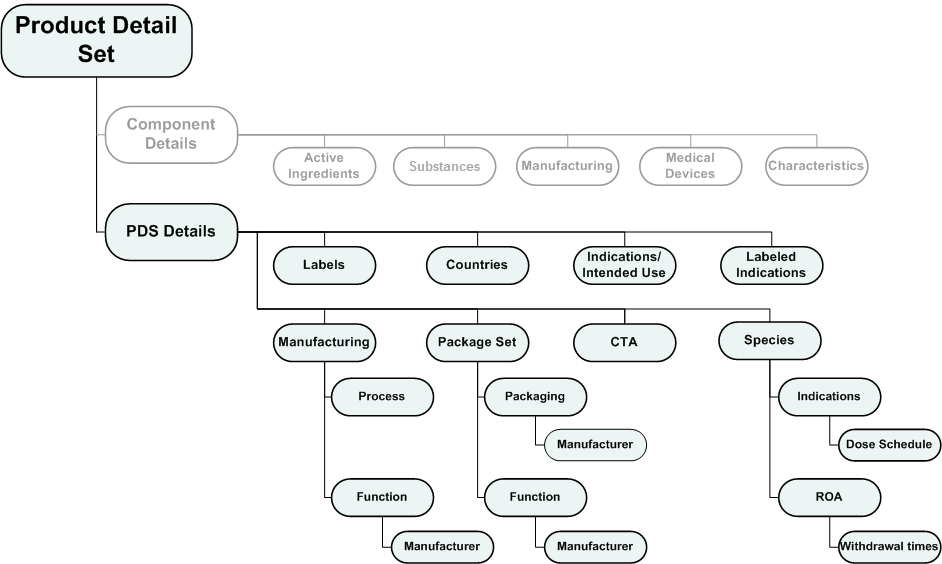
- Clinical Trial Authorization application (CTA) type - CTA node is included.
- Veterinary component entity type - Species node is included and Indications/Intended Use node is excluded (tracked under species detail).
When you click a grouping node, the right pane provides links to InSight registration entities associated with the PDS, like product family, product, application, event, and any PDS details already associated with the grouping node.
Labels
Labels, such as a patient inserts, physician inserts, carton labels, and package labels, are tracked at the PDS level. You may associate zero or more label detail entities with a PDS.
Countries
Details related to the countries defined for an application can be tracked at the PDS level. You may associate zero or more country detail entities with a PDS, however your choice of countries to associate is limited to the countries defined for the application.
Indications/Intended Use
Details related to indications/intended uses that were approved or have been submitted for approval are tracked at the PDS level. You may associate zero or more indications/intended uses detail entities with a PDS, however your choice of indications/intended uses is limited by those defined for the product family. This node is excluded for PDSs associated with veterinary component entity types. For veterinary products, indications are tracked under the Species node by animal.
Labeled Indications
The labeled indication represents text that you and the regulatory body have agreed upon for briefly explaining what ailments the product treats. You may associate only one labeled indication detail entity with a PDS.
PDS Manufacturing
While you can track manufacturing details specifically for package sets and active ingredients in components, you are also able to track manufacturing details for the product detail set as a whole. Manufacturing details are categorized in the tree as the manufacturing processes and functions performed. You may associate zero or more processes and functions, and you can "drill down" to specify more granular details about the steps, materials and manufacturers related to the processes and functions.
Package Sets
Package set detail entities represent the various configurations and presentations that go into packaging a product. For example, a product with a specific dosage form and strength in InSight can be sold in different pack sizes; a 100 tablet bottle or a 500 tablet bottle. Regarding product detail sets, each pack size translates to one package set detail entity in a PDS. You may associate zero or more package set detail entities with a PDS.
In earlier releases of InSight, product detail sets were associated with registrations. Now, the package sets that are tracked at the PDS level are associated with registrations. Multiple package sets can be associated to one registration. However, InSight will not allow associating the same package set to multiple registrations for the same country under one application.
Clinical Trial Authorization Applications (CTAs)
If the application with which the PDS is associated (by way of an event) is a Clinical Trial Application to the European Union, the CTA product detail node appears in the PDS tree. You may associate only one CTA detail entity in a PDS. The CTA detail entity allows you to track data related to the Investigational Medicinal Product in a Clinical Trial Authorization application.
Species
Details about species can be tracked at the PDS level when the product family type for the product with which the PDS is associated is of the veterinary entity type. For each animal species, you can track routes of administration and withdrawal times, and indications (with sub-indications) and dose schedules.