
Publishing Settings
PublishingSettingsLibrary
| Field Name | Field Type |
Matching UI Field |
Description | Acceptable Values |
| submissionId | string | Submission ID |
Identifies each individual regulatory activity (original application, supplement, annual report, etc.) in an application. |
Example: 0001 |
Class com::liquent::insight::manager::publisher::data::publishsettings::PublishingSet Name:
Note: If a field name is not required, but does contain a default value, the default value will be set automatically in the imported Assembly unless otherwise specified in the Assembly XML.
| Field Name | Field Type |
Req (Y/ N) |
Matching UI Field |
Description | Acceptable Values | Default Value |
| id | long | Y |
Unique PublishingSettingsLibrary ID represented by numerical value. This field is used to link classes within Assembly XML. This value will be used to populate corresponding fields in child classes. This ID will be replaced by database ID in the imported assembly. |
Example: 370515 |
| Field Name | Field Type |
Req (Y/ N) |
Matching UI Field |
Description | Acceptable Values | Default Value |
| name | string | Y |
Publishing Library Name |
A unique name for the Publishing Library. | ||
| templateFlag | string | N | Indicates if the Publishing Setting Library is a template or not. |
— Y - creates Publishing Library Template; — N - creates Assembly Publishing Setting Library. |
Y | |
| owner | string | N |
Publishing Library Owner |
The named owner for the Publishing Library. | ||
| keywords | string | N |
Publishing Library Keywords |
Keywords for the Publishing Library. | ||
| changeReasonTypeId | long | N | This field is not used for import. | |||
| changeReasonComment | string | N | This field is not used for import. | |||
| defaultCoverPageId | long | N | Value of the ID field of the CoverPageSetting class. |
Example: 713432 |
||
| defaultTabSheetId | long | N | Value of the ID field of the TabSetting class. |
Example: 713435 |
||
| defaultSlipSheetId | long | N | Value of the ID field of the SlipSetting class. |
Example: 713436 |
||
| defaultDocumentOverlayId | long | N | Value of the ID field of the Overlay class. |
Example: 355046 |
||
| defaultCoverPageOverlayId | long | N | Value of the ID field of the Overlay class. |
Example: 355046 |
||
| defaultTocOverlayId | long | N | Value of the ID field of the Overlay class. |
Example: 355046 |
||
| Field Name | Field Type |
Req (Y/ N) |
Matching UI Field |
Description | Acceptable Values | Default Value |
| defaultAssemblyTocId | long | N | Value of the ID field of the TocType class. |
Example: 713424 |
||
| defaultFolderTocId | long | N | Value of the ID field of the TocType class. |
Example: 713424 |
||
| defaultLeafTocId | long | N | Value of the ID field of the TocType class. |
Example: 713424 |
||
| defaultDocumentTocId | long | N | Value of the ID field of the TocType class. |
Example: 713424 |
||
| defaultExtractTocId | long | N | Value of the ID field of the TocType class. |
Example: 713424 |
||
| defaultVolumeTocId | long | N | Value of the ID field of the TocType class. |
Exampe: 713424 |
||
| defaultSettingsProfileId | long | N | Value of the ID field of the SettingsProfile class. |
Example: 370520 |
PublishingSettings
Class com::liquent::insight::manager::publisher::data::publishsettings::PublishingSet Name:
Note: If a field name is not required, but does contain a default value, the default value will be set automatically in the imported Assembly unless otherwise specified in the Assembly XML.
| Field Name | Field Type | Matching UI Field |
Req (Y/N) |
Description | Acceptable Values | Default Value |
| id | long | Y | Unique PublishingSet tings ID represented by numerical value. Field is used to link classes within Assembly XML. |
Example: 370516 |
| Field Name | Field Type | Matching UI Field |
Req (Y/N) |
Description | Acceptable Values | Default Value |
| printerTypeId | long | Printer | Y |
The Printer that will be used for a Paper Publish. |
Values from the database: — CODE column from ODS.PRIN TER_TYPE table |
By default STANDARDPD F |
| Field Name | Field Type | Matching UI Field |
Req (Y/N) |
Description | Acceptable Values | Default Value |
| mediaParame terTypeId | long |
Paper Size/ Type |
Y |
The Type and Size of the paper that will be printed on (Example: Blue Letter), available options controlled by which printer is selected. |
Values from the database: SELECT mpt.code FROM ods.printe r_type pt, ods.valid_ printer_me dia_type valid, ods.media_ parameter_ type mpt WHERE valid.prin ter_type_i d = pt.id AND mpt.id = valid.medi a_paramete r_type_id AND mpt.tabs_p er_set IS NULL AND pt.code = <CODE>; Where <CODE> is value of ODS.PRINTE R_TYPE.COD E (field value of printerTyp eId). Example: — L-1 — A4-1 |
| Field Name | Field Type | Matching UI Field |
Req (Y/N) |
Description | Acceptable Values | Default Value |
| tabPaperSizeI d | long | Tab Paper Size/Type | Y |
The Type and Size of the paper that will be used for the Tab when printed (Example: Blue Letter). Available options are controlled by the printer that is selected. |
Values from the database: SELECT mpt.code FROM ods.printe r_type pt, ods.valid_ printer_me dia_type valid, ods.media_ parameter_ type mpt WHERE valid.prin ter_type_i d = pt.id AND mpt.id = valid.medi a_paramete r_type_id AND mpt.tabs_p er_set IS NOT NULL AND pt.code = <CODE>; Where <CODE> is value of ODS.PRINTE R_TYPE.COD E (field value of printerTyp eId). |
| Field Name | Field Type | Matching UI Field |
Req (Y/N) |
Description | Acceptable Values | Default Value |
| previewLocati onPath | string | Preview Location | N |
The location used to store any generated previews (Volumes, Tabs). |
Example: //root/ folder |
|
|
inProcessRen ditionLocation Path |
string |
In-Process Rendition Location |
N |
The location used to store the inprocess rendition used when creating inprocess links in Ennov InSight . |
Example: //root/ folder |
| Field Name | Field Type | Matching UI Field |
Req (Y/N) |
Description | Acceptable Values | Default Value |
|
tocDestinatio nNotFoundTe xt |
string |
TOC Destination Not Found Text |
N |
The text that appears in TOCs when a TOC Entry cannot be resolved at publishing time. Destinatio n Not Found Text is used in the following places: — If the target does not exist then value of tocDesti nationNo tFoundTe xt field is used in the right columns of a TOC — This attribute is left blank by default, but text may be entered to assist in the QC of invalid destination s or variables. |
| Field Name | Field Type | Matching UI Field |
Req (Y/N) |
Description | Acceptable Values | Default Value |
| marginXrefDe stinationNotF oundText | string |
Cross Reference Destination Not Found Text |
N | The text to insert when Ennov InSight attempts to insert a margin crossreference but cannot resolve the variable. If blank, no margin crossreference is created for links that cannot be resolved. | ||
| publishingSet tingsLibraryId | long |
Publishing Settings Library |
Y |
Value of the ID field of the PublishingSet tingsLibrary class. |
Example: 370515 |
|
| printerAndPa perSizeId | long | Y |
Value of the ID field of the ValidPrinterM edia class. |
| Field Name | Field Type | Matching UI Field |
Req (Y/N) |
Description | Acceptable Values | Default Value |
| expandBook marksToLevel | long |
Expand Bookmarks to Level |
N |
This field enables users to specify the number of levels to which bookmarks are expanded on the initial opening of electronic (PDF) files published from Ennov InSight . Users can choose to expand bookmarks from 1 to 20 levels, or expand ALL bookmarks, when the published PDF files are opened. The expansion of bookmarks applies to all Publish to eCTD / Electronic options, except XML only. |
0, 1, 2, 3, 4, 5, 6, 7, 8, 9, 10, 11, 12, 13, 14, 15, 16, 17, 18, 19, 20 |
0 - it means ALL bookmarks |
| Field Name | Field Type | Matching UI Field |
Req (Y/N) |
Description | Acceptable Values | Default Value |
| pdfVersion | string |
PDF Version for Published Output |
N |
The field enables users to select the PDF version for the published output. Select one of the following items: — 1.3, Acrobat 4 — 1.4, Acrobat 5 — 1.5, Acrobat 6 — 1.6, Acrobat 7 — 1.7, Acrobat 8 |
— 1.3 — 1.4 — 1.5 — 1.6 — 1.7 |
1.4 |
| defaultRenditi onIdentifier | long | N |
The default Rendition Identifier. |
Rendition Identifier value from Data Administratio n > Rendition Identifier Values Example: Standard Rendition |
Standard Rendition | |
| Field Name | Field Type | Matching UI Field |
Req (Y/N) |
Description | Acceptable Values | Default Value |
| useStandardR enditionFlag | string |
Missing Rendition Identifier Handling |
N |
Defines how to handle situations when the PDF with the defined Rendition Identifier is not available. |
— Y — N |
Y |
| allTabsPrevie wLocationPat h | string | N | This field is not used for import. |
PubSettingsRefDtd
Class com::liquent::insight::manager::publisher::data::publishsettings::PubSettingsRe Name:
| Field Name | Field Type |
Matching UI Field |
Req (Y/N ) |
Description | Acceptable Values | Default Value |
| id | long | Y |
Unique PubSettingsRefDtd ID represented by numerical value. This value will be used to populate corresponding fields in child classes. This ID will be replaced by the database ID in the imported assembly. |
Example: 370518 |
||
| referencedDTDTypeId | long |
XML Definitions |
Y | The XML definitions that are applicable to this Publishing Library (and ultimately the Assembly that uses the Publishing Library). |
DTD Code value from Data Administration > Assembly DTD/ Schema Types |
|
| pubSettingsId | long | Y | The value of the ID field of the PublishingSettings class. |
Example: 370516 |
PubSettingPdfProperty
Class com::liquent::insight::manager::publisher::data::publishsettings::PubSettingPdf Name:
| Field Name | Field Type |
Matching UI Field |
Req (Y/ N) |
Description | Acceptable Values | Default Value |
| id | long | Y |
Unique PubSettingPdfProperty ID represented by numerical value. This field is used to link classes within Assembly XML. This value will be used to populate corresponding fields in child classes. This ID will be replaced by the database ID in the imported assembly. |
Example: 370522 |
||
| name | string | N | This field is not used for import. | |||
| outputPdfPropertyTypeId | long |
Output Property |
Y | Defines the PDF property in the output document. |
PDF Property Name value from Data Administration Properties Values |
|
| propertySource | string |
Property Source |
Y | Defines the source for the PDF property. |
— R - Define Repeatable Value — D - Use Source Document Property — S - Define Single Value |
| Field Name | Field Type |
Matching UI Field |
Req (Y/ N) |
Description | Acceptable Values | Default Value |
| sourcePdfPropertyTypeId | long |
Source Document Property |
Y/N |
Defines the PDF property in source documents to be used as a source for the PDF property in the output document. This field is required if the value of propertySource field is D, otherwise it is not required. |
PDF Property Name value from Data Administration Properties Values |
|
| value | string | Value | Y/N |
Defines the value for the PDF Property in the output document. This field is required if the value of propertySource field is R or S, otherwise it is not required. |
||
| separator | string | Separator | N | Defines the separator to separate values from individual documents within a leaf. | ||
| publishingSettingsLibraryId | long |
Publishing Settings Library |
Y | Value of the ID field of the PublishingSettingsLibrary class. |
Example: 370515 |
|
| changeReasonTypeId | long | N | This field is not used for import. | |||
| changeReasonComment | string | N | This field is not used for import. | |||
| Field Name | Field Type |
Matching UI Field |
Req (Y/ N) |
Description | Acceptable Values | Default Value |
| sourceValue | string | Y/N |
— If the value of the propertySource field is D then the value of this field duplicates the value of the sourcePdfPropertyTypeId field. — If the value of the propertySource field is S or R then the value of this field duplicates the value of the value field. |
Tab
Class com::liquent::insight::manager::publisher::data::specialsheets::Tab Name:
Note: If the Tab class is declared in Assembly XML, then the TabSetting class must also be declared.
| Field Name | Field Type | Matching UI Field |
Req (Y/N) |
Description | Acceptable Values | Default Value |
| name | string | N | This field is not used for import. | |||
| lastGenerationDate | date |
Last Generated Date |
N | This field is not used for import. | ||
| autoTextWrap | string |
Auto Text Wrap |
N | This field is not used for import. | ||
| fontBold | string | Font Bold | N | This field is not used for import. | ||
| fontItalic | string | Font Italic | N | This field is not used for import. | ||
| verticalText | string | Vertical Text | N | This field is not used for import. |
| Field Name | Field Type | Matching UI Field |
Req (Y/N) |
Description | Acceptable Values | Default Value |
| previewFileName | string | N | This field is not used for import. | |||
| tabSettingId | long | Publishing Setting | Y | The value of the ID field of the TabSettings class. | ||
| generationLocationId | long | N | This field is not used for import. | |||
| tabText | string | Overridden Tab Text | N | Text that will overwrite the default tab text. | ||
| tabTextFromLibrary | string |
Tab Text from Publishing Settings Library |
N | This field is not used for import. | ||
| fontTypeId | long |
Font Definition |
N | This field is not used for import. | ||
| fontSize | int | Font Size | N | This field is not used for import. | ||
| printTabMediaTypeId | long | N | This field is not used for import. | |||
| ssIcon | string | Y | See fixed value. |
Fixed value is TAB |
||
| specialSheetType | string | N | This field is not used for import. | |||
| assemblyId | long | Y | The value of the ID field of the Assembly class. | |||
| id | long | Y | Unique Tab ID represented by numerical value. This value is used to populate corresponding fields in child classes. This ID is replaced by the database ID in the imported assembly. | |||
| parentExtractId | long | N | This field is not used for import. |
| Field Name | Field Type | Matching UI Field |
Req (Y/N) |
Description | Acceptable Values | Default Value |
| parentContentId | long | Y |
The value of the ID field of the class that contains this Tab. It can be any class in the following list: — Assembly — Folder — Leaf — Document |
|||
| parentVolumeId | long | N | This field is not used for import. | |||
| documentSourceId | long | N | This field is not used for import. | |||
| childSeqNo | long | Y |
Sequential number of the Tab in the list of Publishing Elements that defines the place in the sequence among the elements that are attached to the current Assembly node. The index starts from zero. See the example in Explanation for childSeqNo Field on page 745. |
0, 1, 2, etc. | ||
| changeReasonTypeId | long | N | This field is not used for import. | |||
| changeReasonComment | string | N | This field is not used for import. | |||
| begDate | date | N | This field is not used for import. | |||
| begUserId | long | N | This field is not used for import. | |||
| creatorId | long | N | This field is not used for import. | |||
| Field Name | Field Type | Matching UI Field |
Req (Y/N) |
Description | Acceptable Values | Default Value |
| creationDate | date | N | This field is not used for import. |
TabSetting
Class com::liquent::insight::manager::publisher::data::publishsettings::TabSetting Name:
| Field Name | Field Type |
Matching UI Field |
Req (Y/ N) |
Description | Acceptable Values | Default Value |
| id | long | Y | The unique TabSetting ID represented by a numerical value. This value is used to populate corresponding fields in child classes. This ID is replaced by the database ID in the imported assembly. |
Example: 713435 |
||
| name | string | Name | Y | Defines the Name of the Tab. Must be unique within the Publishing Settings Library. | ||
| autoTextWrap | string |
Auto Text Wrap |
N | Defines if the text will wrap to multiple lines or not. |
— Y — N |
N |
| publishingSettingsLibraryId | long |
Publishing Settings Library |
Y |
The value of the ID field of the PublishingSettingsLibrary class. |
Example: 370515 |
|
| tabText | string | Text | Y | Defines the text to appear on tabs. Variables can be used to create the tab text. | ||
| fontBold | string | Font Bold | N | Defines if the font on the tab is bold or not. |
— Y — N |
N |
| fontItalic | string | Font Italic | N | Defines if the font on the tab is italic or not. |
— Y — N |
N |
| Field Name | Field Type |
Matching UI Field |
Req (Y/ N) |
Description | Acceptable Values | Default Value |
| fontSize | int | Font Size | Y | Defines the size of the font on the tab. | 10 | |
| verticalText | string | Vertical Text | N | Defines if the text will appear horizontally or vertically. |
— Y — N |
N |
| fontTypeId | long |
Font Definition |
Y | Defines the font style to use on the tabs. | ARIAL | |
| changeReasonTypeId | long | N | The field is not used for import. | |||
| changeReasonComment | string | N | The field is not used for import. |
SpecialSheetOutputChannel
Class com::liquent::insight::manager::publisher::data::outputchannels::SpecialSheetOu Name:
Note: If you create Tab class then SpecialSheetOutputChannel class should be created as well. Relationship is "one Tab class to one SpecialSheetOutputChannel class", for example each specialSheetId field from SpecialSheetOutputChannel class should reference ID field of a Tab class.
| Field Name | Field Type |
Matching UI Field |
Req (Y/ N) |
Description | Acceptable Values | Default Value |
| id | long | Y |
Unique SpecialSheetOutputChannel ID represented by numerical value. This value will be used to populate corresponding fields in child classes. This ID will be replaced by the database ID in the imported assembly. |
|||
| outputChannelTypeId | long | Y | See fixed value. |
Fixed value is PAPER |
||
| specialSheetId | long | Y | Value of ID field of a Tab class. | |||
| Field Name | Field Type |
Matching UI Field |
Req (Y/ N) |
Description | Acceptable Values | Default Value |
| changeReasonComment | string | N | This field is not used for import. | |||
| changeReasonTypeId | long | N | This field is not used for import. |
TOC
Class com::liquent::insight::manager::publisher::data::specialsheets::TOC Name:
Note: If the TOC class is declared in the Assembly XML, then the TocType class must also be declared.
| Field Name | Field Type | Matching UI Field |
Req (Y/N ) |
Description | Acceptable Values | Default Value |
| assemblyId | long | Y |
The value of the ID field of the Assembly class. |
|||
| begDate | date | N | This field is not used for import. | |||
| begUserId | long | N | This field is not used for import. | |||
| bookmark | long | Bookmark Handling | N | This field is not used for import. | ||
| changeReasonComment | string | N | This field is not used for import. | |||
| changeReasonTypeId | long | N | This field is not used for import. |
| Field Name | Field Type | Matching UI Field |
Req (Y/N ) |
Description | Acceptable Values | Default Value |
| childSeqNo | long | Y |
The sequential number of the TOC in the list of Publishing Elements that defines the place in the sequence among the elements that are attached to the current Assembly node. The index starts from zero. See the example in Explanation for childSeqNo Field on page 745. |
0, 1, 2, etc. | ||
| comments | string | Comments | N |
Comments specific to the TOC in the Assembly Outline. |
||
| creationDate | date | N | This field is not used for import. | |||
| creatorId | long | N | This field is not used for import. | |||
| definitionFileReferenceName | string |
TOC Definition File |
N | This field is not used for import. | ||
| desc | string | Description | N |
A description of the TOC in the Assembly Outline. |
||
| destinationEntryText | string |
Right Column Entry Text |
N | This field is not used for import. | ||
| destinationHyperlinkStyle | string | N | This field is not used for import. | |||
| documentSourceId | long | N | This field is not used for import. |
| Field Name | Field Type | Matching UI Field |
Req (Y/N ) |
Description | Acceptable Values | Default Value |
| extractionExcludeText | string | Exclude All Bookmarks with the Text | N | This field is not used for import. | ||
| extractionIncludeText | string |
Include Only Bookmarks with the Text |
N | This field is not used for import. | ||
| extractLevels | long |
Include Bookmarks up to Level |
N | This field is not used for import. | ||
| generationDate | date | TOC Last Generated | N | Displays the date the TOC was last generated. |
Date format - Unix Timestamp. |
|
| generationLocationDisplay | string |
TOC Generation location |
N | This field is not used for import. | ||
| generationLocationId | long | N | This field is not used for import. | |||
| id | long | Y |
Unique TOC ID represented by numerical value. This field is used to link classes within Assembly XML. This value will be used to populate corresponding fields in child classes. This ID will be replaced by database ID in the imported assembly. |
|||
| includeInPageCountFlag | string |
Include in Page Numbering |
N | This field is not used for import. |
| Field Name | Field Type | Matching UI Field |
Req (Y/N ) |
Description | Acceptable Values | Default Value |
| keywords | string | Keywords | N |
Keywords specific to the TOC in the Assembly Outline. |
||
| leaderText | string | Leader | N | This field is not used for import. | ||
| linksToInclude | object |
Include Links to TOCs |
N | This field is not used for import. | ||
| overlaySettingsId | long | Overlay Settings | N |
The overlay to apply on the published output. If set to Use Default, the default overlay at the time of publish will be used. If the overlay settings are set to anything else, these settings will be used at the time of publish. The value of the ID field of the Overlay class. |
||
| overwriteDocFlag | string |
Do Not Overwrite Document |
Y | Do not overwrite document. |
— Y - Yes — N - No |
|
| parentContentId | long | Y |
The value of the ID field of the class that contains this TOC. It can be any class from the following list: — Assembly — Folder — Leaf — Document |
| Field Name | Field Type | Matching UI Field |
Req (Y/N ) |
Description | Acceptable Values | Default Value |
| parentExtractId | long | N | This field is not used for import. | |||
| parentVolumeId | long | N | This field is not used for import. | |||
| plannedPageCount | int |
Planned Number of Pages |
N | The planned number of pages. | ||
| previewDate | date | N | This field is not used for import. | |||
| previewFileName | string | N | This field is not used for import. | |||
| previewGenerationLocation | string | N | This field is not used for import. | |||
| previewGenerationLocationId | long | N | This field is not used for import. | |||
| rangeContentId | long | Range Start | N |
Define a starting location for the content to be included in the TOC other than the node the TOC is inserted onto. It can be any class from the following list: — Assembly — Folder — Leaf — Document |
||
| sourceEntryText | string | Left Column Entry Text** | N | This field is not used for import. | ||
| specialSheetType | string | N | This field is not used for import. | |||
| ssIcon | string | Y | See fixed value. |
Fixed value is TOC |
||
| Field Name | Field Type | Matching UI Field |
Req (Y/N ) |
Description | Acceptable Values | Default Value |
| title | string | Title | Y | A title for the Table of Contents. | ||
| tocLevels | long | Build TOCs to Level | N | This field is not used for import. | ||
| tocTypeId | long | Publishing Setting | Y | Value of the ID field of TocType class. | ||
| typeCaption | string | Header | N | This field is not used for import. |
TocType
Class com::liquent::insight::manager::publisher::data::specialsheets::TocType Name:
| Field Name | Field Type |
Matching UI Field |
Req (Y/ N) |
Description | Acceptable Values | Default Value |
| bookmark | long | Bookmark Handling | N |
Indicates whether or not the entries from this TOC will be used to create the bookmarks in the Leaf, Volume, or SingleFile output file containing this TOC: — File Bookmarks Only Do not use the entries from this TOC to create output file bookmarks. — All TOC Bookmarks - Use all of the entries from this TOC to create output file bookmarks. |
— FILE — ALL |
ALL |
| changeReasonComment | string | N | This field is not used for import. | |||
| changeReasonTypeId | long | N | This field is not used for import. |
| Field Name | Field Type |
Matching UI Field |
Req (Y/ N) |
Description | Acceptable Values | Default Value |
| definitionFileReferenceName | string |
TOC Definition File |
Y | A link to the document to use to define the Table of Contents. | Example: // root/folder/ file | |
| destinationEntryText | string |
Right Column Entry Text |
Y | Defines the text to appear on the right side of the output TOC, typically a variable. | ||
| destinationHyperlinkStyle | string | N | This field is not used for import. | |||
| elementType | long | N | This field is not used for import. | |||
| extractionExcludeText | string | Exclude All Bookmarks with the Text | N | Defines the bookmarks to exclude based on name, and allows for tables and figures to be excluded. Words separated by ; are treated as separate entries. | ||
| extractionIncludeText | string |
Include Only Bookmarks with the Text |
N | Defines the bookmarks to include based on name, and allows tables and figures to be included. Words separated by ; are treated as separate entries. | ||
| extractLevels | long |
Including Bookmarks up to Level |
N | Defines how many levels of Bookmarks from the starting point of the TOC to include in the output TOC. Must be within the Build TOCs to level range. | Number from 1 to 20. | 1 |
| Field Name | Field Type |
Matching UI Field |
Req (Y/ N) |
Description | Acceptable Values | Default Value |
| id | long | Y | The unique TocType ID represented by a numerical value. This field is used to link classes within Assembly XML. This value is used to populate corresponding fields in child classes. This ID is replaced by the database ID in the imported assembly. | |||
| includeInPageCountFlag | string |
Include in Page Numbering |
Y | Defines if the TOC pages should be included in the overall page count. |
— Y — N |
|
| leaderText | string | Leader | Y | Defines the leader to use between the text and the right column entry text. |
— USETEMPLATE - Use Template; — SPACE - Space " "; — DASH - Dash "---"; — DOT - Dot "..."; — UNDERLINE - Underline "___". |
|
| name | string | Name | Y | A unique name for the Table of Contents. | Must be unique within Assembly XML. | |
| publishingSettingsLibraryId | long | Y |
The value of the ID field of the PublishingSettingsLibrary class. |
Example: 370515 |
||
| sourceEntryText | string |
Left Column Entry Text** |
N | Defines the text to appear on the left side of the output TOC, typically either blank or a variable. | ||
| Field Name | Field Type |
Matching UI Field |
Req (Y/ N) |
Description | Acceptable Values | Default Value |
| tocLevels | long | Build TOCs to Level | N | Defines how many levels from the starting point of the TOC to include in the output TOC. | Number from 1 to 20. | 3 |
| typeCaption | string | Header | N | The header that replaces the word header within the TOC Definition File. |
TOCTypeOutputChannel
Class com::liquent::insight::manager::publisher::data::outputchannels::TOCTypeOutputC Name:
The TOCTypeOutputChannel is a specific class that is related to the "Output Channel" UI multiselect field of the TOC Type UI element. Therefore, you need to declare as many TOCTypeOutputChannel classes in Assembly XML for each TocType class as you need to select the "OutputChannel" values for the corresponding TocType class. For example, if you want to select ELEC and PAPER for the current TocType class, then you must create two TOCTypeOutputChannel classes. One for ELEC (the outputChannelTypeId field value is ELEC), one for PAPER (the outputChannelTypeId field value is PAPER) and associate both to the current TocType class (value of the tocTypeId field is value of id field of this TocType class).
| Field Name | Field Type |
Matching UI Field |
Req (Y/N ) |
Description | Acceptable Values | Default Value |
| id | long | Y |
Unique TOCTypeOutputChannel ID represented by numerical value. This field is used to link classes within Assembly XML. This value is used to populate corresponding fields in child classes. This ID is replaced by the database ID in the imported assembly. |
|||
| outputChannelTypeId | long | Output Channel | Y | Defines what Output channel to use within the published output. |
— ELEC — PAPER |
|
| tocTypeId | long | Y | Value of the ID field of TocType class. | |||
| Field Name | Field Type |
Matching UI Field |
Req (Y/N ) |
Description | Acceptable Values | Default Value |
| changeReasonComment | string | N | This field is not used for import. | |||
| changeReasonTypeId | long | N | This field is not used for import. |
TOCEntryGenOption
Class com::liquent::insight::manager::publisher::data::specialsheets::TOCEntryGenOpti Name:
The TOCEntryGenOption is a specific class that is related to the "Tree Elements to Include in TOC" UI multiselect field of the TOC Type UI element. Therefore, you need to declare as many TOCEntryGenOption classes in Assembly XML for each TocType class as you need to select the "Tree Elements to Include in TOC" values for the corresponding TocType class. For example, if you want to select FOLDER, DOCUMENT, etc., for the current TocType class, then you must create a TOCEntryGenOption class for each value. One for FOLDER (the entityTypeId field value is FOLDER), one for DOCUMENT (the entityTypeId field value is
DOCUMENT), etc., and associate all classes to the current TocType class (value of the tocTypeId field is the value of the id field of this TocType class).
| Field Name | Field Type |
Matching UI Field |
Req (Y/N ) |
Description | Acceptable Values | Default Value |
| id | long | Y |
The unique TOCEntryGenOption ID represented by a numerical value. This field is used to link classes within Assembly XML. This value is used to populate corresponding fields in child classes. This ID is replaced by the database ID in the imported assembly. |
|||
| entityTypeId | long |
Tree Elements to Include in TOC |
Y | Defines which Tree elements will be included in this TOC. |
— TOC — EXTRACT — LEAF — FOLDER — DOCUMENT |
|
| Field Name | Field Type |
Matching UI Field |
Req (Y/N ) |
Description | Acceptable Values | Default Value |
| tocId | long | N | This field is not used for import. | |||
| tocTypeId | long | Y | The value of the ID field of the TocType class. | |||
| changeReasonTypeId | long | N | This field is not used for import. | |||
| changeReasonComment | string | N | This field is not used for import. |
| Field Name | Field Type | Matching UI Field |
Req (Y/ N) |
Description | Acceptable Values | Defau Value |
| lastPublishedOutputLocationDisplay | string |
Last Published Location |
N | This field is not used for import. | ||
| lastEstimatedSize | long |
Last Estimated Size (in MB) |
N | This field is not used for import. | ||
| lastEstimatedDate | date |
Last Estimated Date |
N | This field is not used for import. | ||
| lastPublishedSize | long |
Last Published Size (in MB) |
N | This field is not used for import. | ||
| lastPublishedDate | date |
Last Published Date |
N | This field is not used for import. | ||
| volumizeBySizeFlag | string | Volumize by Size | N | Defines if the volumization should be done by number of pages or by estimated size of the volume. |
— Y — N |
N |
Volume
Class Name: com::liquent::insight::manager::publisher::data::Volume
| Field Name | Field Type | Matching UI Field |
Req (Y/ N) |
Description | Acceptable Values | Defau Value |
| maxVolumeSize | long |
Total Size (in MB) |
N | Defines the maximum size of the volume, used when running volumize by size. |
Numeric and greater than 50 |
100 |
| volumeBufferSize | long | Buffer Size (in MB) | N | The additional buffer allowed in a volume, used when running volumize by size. |
Numeric and greater than 10 |
10 |
| id | long | Y | The unique Volume ID represented by a numerical value. This field is used to link classes within Assembly XML. This value will be used to populate corresponding fields in child classes. This ID will be replaced by the database ID in the imported assembly. | |||
| firstContentId | long | N | This field is not used for import. | |||
| lastContentId | long | N | This field is not used for import. | |||
| firstContentSeqNum | long | N | This field is not used for import. | |||
| lastContentSeqNum | long | N | This field is not used for import. | |||
| firstExtractSeqNum | long | N | This field is not used for import. | |||
| lastExtractSeqNum | long | N | This field is not used for import. | |||
| assemblyId | long | N | This field is not used for import. | |||
| firstExtractId | long | N | This field is not used for import. |
| Field Name | Field Type | Matching UI Field |
Req (Y/ N) |
Description | Acceptable Values | Defau Value |
| lastExtractId | long | N | This field is not used for import. | |||
| name | string | Name | N | This field is not used for import. | ||
| nodeNumber | int |
Begin at Volume Number |
N | The number that should be used to start the volumes. | Numeric and greater than zero. | 1 |
| actualSheetCount | int | Total Sheets/ Pages | N | The total number of sheets/pages to include in a volume, used when running volumize by number of pages. | 300 | |
| maxSheetCount | int | N | This field is not used for import. | |||
| sheetBufferCount | int | Total Sheets/ Pages Buffer | N | The additional sheets/ pages buffer allowed in a volume, used when running volumize by number of pages. | 50 | |
| lockType | string | N | This field is not used for import. | |||
| autoCreateTocsFlag | string |
Automatically Create Volume Tables of Contents |
N | Defines if a TOC should be created for each Volume inserted. |
— Y — N |
N |
| numberingSchema | string |
Volume File Naming Format |
N | The format that should be applied to the Volume File Name, typically this is a variable. | $VOLN | |
| relativeType | string |
Volume Numbering |
N | Defines if the Volume numbering should be reset at every major division, or relative to the Assembly. |
— divRelative — asmRelative |
asmRe |
| isDuplexFlag | string | N | This field is not used for import. |
| Field Name | Field Type | Matching UI Field |
Req (Y/ N) |
Description | Acceptable Values | Defau Value |
| lastPublishedOutputLocationId | string | N | This field is not used for import. | |||
| changeReasonComment | string | N | This field is not used for import. | |||
| changeReasonTypeId | string | N | This field is not used for import. | |||
| publishingSettingsLibraryId | long | Y | Value of ID field of PublishingSettingsLibrary class. |
Example: 370515 |
Variable
Class Name: com::liquent::insight::manager::publisher::data::Variable
| Field Name | Field Type |
Matching UI Field |
Req (Y/ N) |
Description | Acceptable Values | Default Value |
| activeFlag | string | Is Active? | N | Defines if the variable is active or not. |
— Y — N |
Y |
| changeReasonComment | string | N | This field is not used for import. | |||
| changeReasonTypeId | long | N | This field is not used for import. |
| Field Name | Field Type |
Matching UI Field |
Req (Y/ N) |
Description | Acceptable Values | Default Value |
| code | string |
Variable Code |
Y |
The variable code that is used in the document or tree structure. The Variable Code - Output Channel combination must be unique within the Publishing Settings Library. The Variable Code must not be the one defined in Assembly Repository Variables, Assembly System Defined Variables, Assembly User Defined Variables, and Ennov InSight Assembly Variables. |
||
| description | string | Description | N | A description of the variable. | ||
| documentType | string | N | This field is not used for import. | |||
| id | long | Y | The unique Variable ID represented by a numerical value. This value is used to populate corresponding fields in child classes. This ID is replaced by the database ID in the imported assembly. | |||
| name | string |
Variable Name |
Y | The human readable name of the variable code. | ||
| outputChannelTypeId | long | N | This field is not used for import. | |||
| publishingSettingsLibraryId | long |
Publishing Settings Library |
Y |
The value of the ID field of the PublishingSettingsLibrary class. |
Example: 370515 |
|
| Field Name | Field Type |
Matching UI Field |
Req (Y/ N) |
Description | Acceptable Values | Default Value |
| typeId | long | Y | See fixed value. |
Fixed value is USER |
||
| variableStampType | string |
Variable Type |
N | The type of variable being configured. |
— S - Single- Line Variable — M - Multiple- Line Variable |
S |
| variableValue | string | Variable Value | Y | The value to which the variable will resolve. This could be free text or another variable. |
VariableOutputChannel
Class com::liquent::insight::manager::publisher::data::outputchannels::VariableOutput Name:
Note: The VariableOutputChannel is a specific class that is related to the "Output Channel" UI multiselect field of the Variable UI element. Therefore, you need to declare as many VariableOutputChannel classes in Assembly XML for each Variable class as you need to select the "OutputChannel" values for the corresponding Variable class.
For example, if you want to select ELEC and PAPER for the current Variable class, then you must create two
VariableOutputChannel classes: one for ELEC (the outputChannelTypeId field value is ELEC), one for PAPER (the outputChannelTypeId field value is PAPER), and associate both to the current Variable class (value of the variableId field is the value of the id field of this Variable class).
| Field Name | Field Type |
Matching UI field |
Req (Y/N ) |
Description | Acceptable values | Default value |
| id | long | Y |
The unique VariableOutputChannel ID represented by a numerical value. This value is used to populate corresponding fields in child classes. This ID is replaced by the database ID in the imported assembly. |
|||
| outputChannelTypeId | long | Output Channel | Y | Defines the output channel for the variable to resolve in. |
— ELEC — PAPER |
|
| variableId | long | Y | The value of the ID field of the Variable class. | |||
| changeReasonComment | string | N | This field is not used for import. | |||
| changeReasonTypeId | long | N | This field is not used for import. |
Slip
Class com::liquent::insight::manager::publisher::data::specialsheets::Slip Name:
| Field Name | Field Type |
Matching UI Field |
Req (Y/N) |
Description | Acceptable Values | Default Value |
| assemblyId | long | Y | The value of the ID field of the Assembly class. | |||
| begDate | date | N | This field is not used for import. | |||
| begUserId | long | N | This field is not used for import. | |||
| changeReasonComment | string | N | This field is not used for import. | |||
| changeReasonTypeId | long | N | This field is not used for import. |
| Field Name | Field Type |
Matching UI Field |
Req (Y/N) |
Description | Acceptable Values | Default Value |
| childSeqNo | long | Y |
Sequential number of Slip in list of Publishing Elements that defines the place in the sequence among the elements that are attached to the current Assembly node. Index starts from zero. See the example in Explanation for childSeqNo Field on page 745. |
|||
| creationDate | date | N | This field is not used for import. | |||
| creatorId | long | N | This field is not used for import. | |||
| documentSourceId | long | N | This field is not used for import. | |||
| id | long | Y | The unique Slip ID represented by a numerical value. This value will be used to populate corresponding fields in child classes. This ID will be replaced by the database ID in the imported assembly. | |||
| parentContentId | long | Y |
The value of the ID field of the class that contains this Slip. It can be any class from the following list: — Assembly — Folder — Leaf — Document |
|||
| parentExtractId | long | N | This field is not used for import. | |||
| Field Name | Field Type |
Matching UI Field |
Req (Y/N) |
Description | Acceptable Values | Default Value |
| parentVolumeId | long | N | This field is not used for import. | |||
| printSlipMediaTypeId | long | Paper Type | N | This field is not used for import. | ||
| slipSettingId | long | Publishing Setting | Y | The value of the ID field of the SlipSetting class. | ||
| specialSheetType | string | N | This field is not used for import. | |||
| ssIcon | string | Y | See fixed value. |
Fixed value is SLIP |
SlipSetting
Class com::liquent::insight::manager::publisher::data::publishsettings::SlipSetting Name:
| Field Name | Field Type |
Matching UI Field |
Req (Y/ N) |
Description | Acceptable Values | Default Value |
| id | long | Y | The unique SlipSetting ID represented by a numerical value. This value will be used to populate corresponding fields in child classes. This ID will be replaced by the database ID in the imported assembly. | |||
| name | string | Name | Y | A unique name for the Slip Sheet settings. | ||
| publishingSettingsLibraryId | long |
Publishing Settings Library |
Y |
The value of the ID field of the PublishingSettingsLibrary class. |
Example: 370515 |
|
| printMediaTypeId | long | Y | The value of the ID field of the ValidPrinterMedia class. | |||
| Field Name | Field Type |
Matching UI Field |
Req (Y/ N) |
Description | Acceptable Values | Default Value |
| paperTypeId | long | Paper Type | N | This field is not used for import. | ||
| changeReasonTypeId | long | N | This field is not used for import. | |||
| changeReasonComment | string | N | This field is not used for import. |
CoverSettingOutputChannel
Class com::liquent::insight::manager::publisher::data::publishsettings::CoverSettingO Name:
| Field Name | Field Type |
Matching UI Field |
Req (Y/ N) |
Description | Acceptable Values | Default Value |
| changeReasonComment | string | N | This field is not used for import. | |||
| changeReasonTypeId | long | N | This field is not used for import. | |||
| coverSettingId | long | Y | The value of the ID field of the CoverPageSetting class. | |||
| id | long | Y |
The unique CoverSettingOutputChannel ID represented by a numerical value. This value will be used to populate corresponding fields in child classes. This ID will be replaced by the database ID in the imported assembly. |
|||
| outputChannelTypeId | long | Output Channel | Y | Defines if the Cover Page is published for a specific output channel or for all output channels. |
— ELEC — PAPER |
CoverPageSetting
Class com::liquent::insight::manager::publisher::data::publishsettings::CoverPageSett Name:
| Field Name | Field Type |
Matching UI field |
Req (Y/ N) |
Description | Acceptable values | Default value |
| changeReasonComment | string | N | This field is not used for import. | |||
| changeReasonTypeId | long | N | This field is not used for import. | |||
| id | long | Y |
The unique CoverPageSetting ID represented by a numerical value. This value is used to populate corresponding fields in child classes. This ID is replaced by the database ID in the imported assembly. |
|||
| inclInPageCountFlag | string |
Include in Page Numbering |
Y | Defines if the Cover Page is counted in the page numbering, affects variables. |
— Y — N |
|
| name | string | Name | Y | The name used to identify the Cover Page, and is also resolved as the <NAME> variable. The Cover Page Name must be unique within the Publishing Settings Library. | ||
| paperTypeId | long | Paper Type | N | This field is not used for import. | ||
| plannedPageCount | int |
Planned Number of Pages |
N | The planned number of pages this cover page will use in the published output. | Must be numeric, max number: 2^31 -1 | |
| printMediaTypeId | long | Y | The value of the ID field of the ValidPrinterMedia class. | |||
| Field Name | Field Type |
Matching UI field |
Req (Y/ N) |
Description | Acceptable values | Default value |
| publishingSettingsLibraryId | long | Y |
The value of ID field of the PublishingSettingsLibrary class. |
Example: 370515 |
||
| srcName | string | Cover Page Template | Y | The location of the document to be used as the template for the Cover Page. | Example: // root/ folder/ file | |
| templateId | long | N | This field is not used for import. |
Cover
Class com::liquent::insight::manager::publisher::data::specialsheets::Cover Name:
| Field Name | Field Type |
Matching UI Field |
Req (Y/N ) |
Description | Acceptable Values | Default Value |
| assemblyId | long | Y | The value of the ID field of the Assembly class. | |||
| changeReasonComment | string | N | This field is not used for import. | |||
| changeReasonTypeId | long | N | This field is not used for import. | |||
| childSeqNo | long | Y |
The sequential number of the Cover in the list of Publishing Elements that defines the place in the sequence among the elements that are attached to the current Assembly node. The index starts from zero. See example in Explanation for childSeqNo Field on page 745. |
| Field Name | Field Type |
Matching UI Field |
Req (Y/N ) |
Description | Acceptable Values | Default Value |
| coverPageSettingId | long | Publishing Setting | Y |
The value of the Name field of the CoverPageSetting class. |
||
| coverSettingId | long | Y | The value of the ID field of the CoverPageSetting class. | |||
| creatorId | long | N | This field is not used for import. | |||
| documentSourceId | long | N | This field is not used for import. | |||
| generationLocationId | long | N | This field is not used for import. | |||
| id | long | Y | The unique Cover ID represented by a numerical value. This value is used to populate corresponding fields in child classes. This ID is replaced by database ID in the imported assembly. | |||
| inclInPageNumbersFlag | string |
Include in Page Numbering |
N | This field is not used for import. | ||
| lastGenerationDate | date | N | This field is not used for import. | |||
| name | string | Name | Y | The name used to identify the Cover Page, and is also resolved as the <NAME> variable. The Cover Page Name must be unique within the Publishing Settings Library. | ||
| overlaySettingsId | long | Overlay Setting | N | The value of the ID field of the Overlay class. | ||
| Field Name | Field Type |
Matching UI Field |
Req (Y/N ) |
Description | Acceptable Values | Default Value |
| parentContentId | long | Y |
The value of the ID field of the class that contains this Cover. It can be any class from the following list: — Assembly — Folder — Leaf — Document |
|||
| parentExtractId | long | N | This field is not used for import. | |||
| parentVolumeId | long | N | This field is not used for import. | |||
| plannedPageCount | int |
Planned Number of Pages |
N | This field is not used for import. | ||
| printCoverMediaTypeId | long | Paper Type | N | This field is not used for import. | ||
| publishingSettingsLibraryId | long | N | This field is not used for import. | |||
| specialSheetType | string | N | This field is not used for import. | |||
| srcName | string | Cover Page Template | N | This field is not used for import. | ||
| ssIcon | string | Y | See fixed value. |
Fixed value is COVER |
||
| templateId | long | N | This field is not used for import. | |||
| title | string | Title | N | The title of the Cover Page. |
SettingsProfile
Class Name: com::liquent::insight::manager::publisher::data::SettingsProfile
| Field Name | Field Type |
Matching UI Field |
Req (Y/ N) |
Description | Acceptable Values | Default Value |
| id | long | Y |
The unique SettingsProfile ID represented by a numerical value. This value is used to populate corresponding fields in child classes. This ID is replaced by the database ID in the imported assembly. |
|||
| profileName | string |
Link Profile Name |
Y | The unique name for the Link Profile. | ||
| linkStyleTypeId | long |
Electronic Hyperlink Style |
Y | Defines the style of the hyperlink. |
— DASHEDBOX — SOLIDBOX — UNDERLINE — NONE |
|
| linkColorTypeId | long |
Electronic Hyperlink Color |
N | The color of the hyperlink in the published output. |
— BLUE — BLACK |
BLUE |
| linkLineThicknessTypeId | long |
Electronic Hyperlink Line Thickness |
Y | Defines the thickness of the line in the published output. |
— MEDIUM — THIN — THICK |
|
| marginXrefSize | long |
Margin Cross Reference Size |
Y | The font size to use when creating Margin Cross References. |
Example: 10 |
|
| Field Name | Field Type |
Matching UI Field |
Req (Y/ N) |
Description | Acceptable Values | Default Value |
| marginXrefFontStyleId | long |
Margin Cross Reference Text Font Style |
Y | The font to use when creating Margin Cross References. |
— Arial - ARIAL — Arial Narrow - ARIALN — Courier - COURIERN — MS Mincho MSMINCHO — Times New Roman TIMESNR |
|
| marginXrefTextFormat | string |
Margin Cross Reference Text Format |
N | The format for all margin cross reference links to follow. Variables will be used here. | ||
| changeReasonComment | string | N | This field is not used for import. | |||
| changeReasonTypeId | long | N | This field is not used for import. | |||
| publishingSettingsLibraryId | long |
Publishing Settings Library |
Y | Value of ID field of PublishingSettingsLibrary class. |
Example: 370515 |
|
| isLibraryDefault | string | Default? | N | Defines if the Profile is the System Default Profile. |
— Y — N |
|
| crossDocumentLinkHandling | string |
Cross- Document Link Handling |
N | Defines whether crossdocument links are opened in the same window. |
S, N, or D: — Open in a the Same Window - S — Open in a New Window - N — Default - D |
D |
PageMarker
Class Name: com::liquent::insight::manager::publisher::data::PageMarker
| Field Name | Field Type | Matching UI Field |
Req (Y/N ) |
Description | Acceptable Values | Default Value |
| begDate | date | N | This field is not used for import. | |||
| begUserId | long | N | This field is not used for import. | |||
| changeReasonComment | string | N | This field is not used for import. | |||
| changeReasonTypeId | long | N | This field is not used for import. | |||
| comments | string | Comments | N | Any additional information you want to save with the page marker. | ||
| createdByVolumizeFlag | string | Created by Volumization | N | This field is not used for import. | ||
| creationDate | date | N | This field is not used for import. | |||
| creatorId | long | N | This field is not used for import. | |||
| depth | int | N | This field is not used for import. | |||
| description | string | Description | N | The description of the Page Marker. | ||
| documentSourceId | long | N | This field is not used for import. | |||
| id | long | Y | The unique PageMarker ID represented by a numerical value. This value will be used to populate corresponding fields in child classes. This ID will be replaced by the database ID in the imported assembly. | |||
| keywords | string | Keywords | N | The keywords you can use in a search for the page marker. | ||
| Field Name | Field Type | Matching UI Field |
Req (Y/N ) |
Description | Acceptable Values | Default Value |
| name | string |
Page Marker Name |
N | The name of the Page Marker. Name is not unique. |
By default name is "Page Marker" |
|
| orderNo | long | Y |
The index is the size of the pageNumber field. The index starts from zero. For example: — pageNumber=3, orderNo=0 — pageNumber=11, orderNo=1 — pageNumber=22, orderNo=2 — pageNumber=99, orderNo=3 |
Example: 0, 1, 2, etc. |
||
| pageMarkerFlag | string | N | This field is not used for import. | |||
| pageNumber | int | Page Number | Y | The page on which the page marker is applied. | ||
| parentContentId | long | Y | The value of the ID field of the Document class. Every PageMarker belongs to Document. |
DefaultPublishingValues
Class com::liquent::insight::manager::publisher::data::publishsettings::DefaultPublis Name:
| Field Name | Field Type |
Matching UI Field |
Req (Y/ N) |
Description | Acceptable Values | Default Value |
| actuate | string | Actuate | N | The default Actuate setting of any new leafs. |
— onLoad — none — other — onRequest |
|
| applicationVersion | string | Application Version | N | The default Application Version of any new leafs. | ||
| folderDueDate | date | Folder Due Date | N | The default due date of any new folders. |
Date is in Unix Timestamp date format. |
|
| folderOwner | string | Folder Owner | N | The default owner of any new folders. | ||
| fontLibrary | string | Font Library | N | The default Font Library of any new leafs. | ||
| Id | long | Y |
The unique DefaultPublishingValues ID represented by numerical value. This value is used to populate corresponding fields in child classes. This ID is replaced by the database ID in the imported assembly. |
|||
| keywords | string | Keywords | N | The default Keywords of any new leafs. | ||
| language | string | Language | N | The default language of any new leafs. | ||
| leafDueDate | date | Leaf Due Date | N | The default due date of any new leafs. |
Date is in Unix Timestamp date format. |
|
| leafOwner | string | Leaf Owner | N | The default owner of any new leafs. | ||
| Field Name | Field Type |
Matching UI Field |
Req (Y/ N) |
Description | Acceptable Values | Default Value |
| publishingSettingsLibraryId | long |
Publishing Settings Library |
Y |
The value of the ID field of the PublishingSettingsLibrary class. |
Example: 370515 |
|
| role | string | Role | N | The default Role of any new leafs. | ||
| show | string | Show | N | The default Show setting of any new leafs. |
— embed — none — other — new — replace |
|
| title | string | Title | N | The default title of any new leafs. | ||
| useNativeFileFlag | string |
Use Native File |
N | Defines if new leafs should be created as Native Files. |
— T - Yes — F - No |
|
| version | string | Version | N | The default Version of any new leafs. |
ValidPrinterMedia
Class com::liquent::insight::manager::publisher::data::paper::ValidPrinterMedia Name:
You can skip the creation of the XML for ValidPrinterMedia class, because this is a shared class. The import does not create it, the import finds it and attaches it to the Ennov InSight system. When a valid XML is created for the PublishingSettings class, the corresponding ValidaPrinterMedia class will be created automatically, so there is no need to define that class in the Assembly XML.
Overlay
Class Name: com::liquent::insight::manager::publisher::data::overlays::Overlay
| Field Name | Field Type | Matching UI Field | Req(Y/ N) | Description | Acceptable Values | Default Value |
| autofitFlag | string |
Scale Content to Margins |
N | Scales the content to the margins defined for the overlay. |
— Y — N |
N |
| Field Name | Field Type | Matching UI Field | Req(Y/ N) | Description | Acceptable Values | Default Value |
| bestfitFlag | string | Apply Best Fit Overlay | N | Used to find the best fitting overlay page from the overlay template. |
— Y — N |
N |
| changeReasonComment | string | N | This field is not used for import. | |||
| changeReasonTypeId | long | N | This field is not used for import. | |||
| id | long | Y | The unique Overlay ID represented by a numerical value. This value is used to populate corresponding fields in child classes. This ID is replaced by the database ID in the imported assembly. | |||
| landscapeMarginBottom | long |
Landscape Margin Bottom |
N | Defines the size of the bottom margin on landscape pages. |
See Explanation for Overlay Class Fields |
|
| landscapeMarginLeft | long | Landscape Margin Left | N | Defines the size of the left margin on landscape pages. |
See Explanation for Overlay Class Fields |
|
| landscapeMarginRight | long | Landscape Margin Right | N | Defines the size of the right margin on landscape pages. |
See Explanation for Overlay Class Fields |
|
| landscapeMarginTop | long | Landscape Margin Top | N | Defines the size of the top margin on landscape pages. |
See Explanation for Overlay Class Fields |
|
| measurementTypeId | long |
Measurement Unit |
N | Defines the measurement unit to be used for the margins. |
— INCHES — CENTIMETERS |
INCHES |
| name | string | Name | Y | A unique name for the Overlay. |
| Field Name | Field Type | Matching UI Field | Req(Y/ N) | Description | Acceptable Values | Default Value |
| portraitMarginBottom | long |
Portrait Margin Bottom |
N | Defines the size of the bottom margin on portrait pages. |
See Explanation for Overlay Class Fields |
|
| portraitMarginLeft | long |
Portrait Margin Left |
N | Defines the size of the left margin on portrait pages. |
See Explanation for Overlay Class Fields |
|
| portraitMarginRight | long |
Portrait Margin Right |
N | Defines the size of the right margin on portrait pages. |
See Explanation for Overlay Class Fields |
|
| portraitMarginTop | long |
Portrait Margin Top |
N | Defines the size of the top margin on portrait pages. |
See Explanation for Overlay Class Fields |
|
| publishingSettingsLibraryId | long |
Publishing Settings Library |
Y | Value of ID field of PublishingSettingsLibrary class. |
Example: 370515 |
|
| refNotFoundText | string | N | This field is not used for import. | |||
| rotateOverlayFlag | string |
Rotate Overlay to Content |
N | Rotates the overlay to fit the content correctly. |
— Y — N |
N |
| scaleOverlayFlag | string | Scale Overlay to Content Page Size | N | Scales the overlay to fit the content correctly. |
— Y — N |
N |
| srcNameOverlay | string |
Overlay Template File |
N | A link to the document to use to define the Overlay. No template has to be defined, this will effectively be a blank overlay if there is nothing defined. |
Example: //root/ folder/file |
Assembly XML Publishing Settings: Explanations
Explanation for childSeqNo Field
The value of the childSeqNo field contains the position number of the element in the element's sequence of the node (from left to right starting at 0). The elements can be in any order.
This example shows values for childSeqNo fields of several elements:
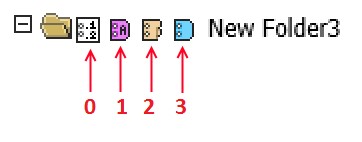
Where:
— 0 - TOC
— 1 - Cover
— 2 - Tab
— 3 - Slip
Explanation for Overlay Class Fields
This field has a validator that checks the input value. If a specified value is not valid, then the following message appears:
Margin Value is invalid. Not valid range (inches 0.1 - 2.0, centimeters 0.26 - 5.1).
The input value should be a number with fractional part, but if the field type is long, the field does not accept the number with fractional part. Converter solves this.
There are two cases, depending on value of measurementTypeId field.
— If the value of the measurementTypeId field is INCHES and you want to put 0.1 into a field, then you should multiply 0.1 by 2540. The result is the value of field.
— If the value of the measurementTypeId field is CENTIMETERS and you want to put 0.26 into a field, then you should multiply 0.26 by 1000. The 260 result is the value of field.