
Assembly Elements Context Menu
Use the Assembly Elements Context Menu to add, modify, or perform actions on publishing elements.
The Assembly Elements Context Menu is dynamic, providing options relevant to the selected root, folder, leaf, or document element node.
The options in the context menu depend on the Locked/Unlocked status of the assembly and on the particular node, user license, security settings, and view of the assembly where it is invoked.
In the Assembly Elements tree of an assembly, right-click on a node in the tree to view the Assembly Elements Context Menu for that node. The following images show some (but not all) of the different Assembly Elements Context Menu options available for the different types of nodes. See Icons for descriptions.
Root Node Context Menu
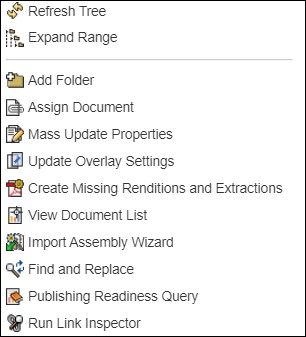
Figure 1: Context menu for a root node
Folder Node Context Menu
The Promote, Demote, Move Up, and Move Down options availability depends on the position of the selected Folder element in the Assembly Tree. For example, if the folder element is the first in the range, then the Move Up option will not be presented in the context menu for such an element.
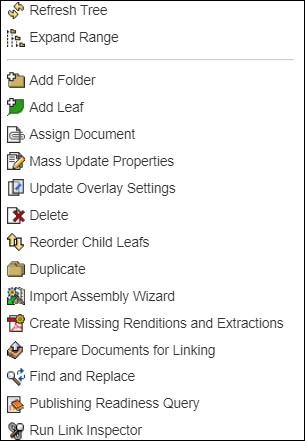
Figure 2: Context menu for a folder node
Leaf Node Context Menu
The Promote, Demote, Move Up, and Move Down options availability depends on the position of the selected Leaf element in the Assembly Tree. For example, if the leaf element is the first in the range, then the Move Up option will not be presented in the context menu for such an element.
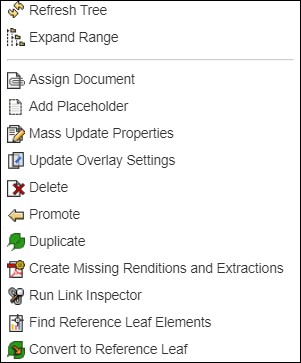
Figure 3: Context menu for a leaf node Reference Leaf Node Context Menu
The Promote, Demote, Move Up, and Move Down options availability depends on the position of the selected Reference Leaf element in the Assembly Tree. For example, if the reference leaf element is the first in the range, then the Move Up option will not be presented in the context menu for such an element.
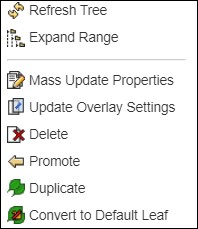
Figure 4: Context menu for a reference leaf node
Document Node Context Menu
The Promote, Demote, Move Up, and Move Down options availability depends on the position of the selected Document element in the Assembly Tree. For example, if the document element is the first in the range, then the Move Up option will not be presented in the context menu for such an element.
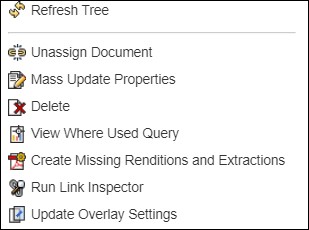
Figure 5: Context menu for a document node
Placeholder Node Context Menu
The Promote, Demote, Move Up, and Move Down options availability depends on the position of the selected Placeholder element in the Assembly Tree. For example, if the placeholder element is the first in the range, then the Move Up option will not be presented in the context menu for such an element.
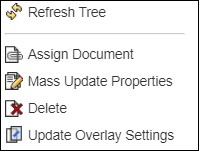
Figure 6: Context menu for a placeholder node