
Manage Concurrently Planned Sequences
As you work on multiple planned sequences, it is important to understand how the submitted view is created. When you create the working assembly, the submitted view is a cumulative snapshot of all the sequences you have submitted. Once a submitted view is created for a planned assembly, it does not change.
If you are working on two planned sequences at the same time, they are both based on the same submitted sequence. In the example below, the submitted view of both 2 and 3 are based on 1, which is the only submitted sequence.
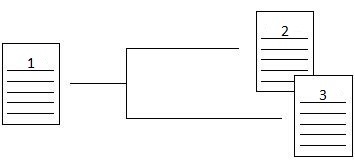
You may submit 3 to the regulatory agency before you submit 2. Both of these sequences may modify the same eCTD sections, and in fact they may modify the same eCTD leaf elements.
In the example above, when 2 is submitted, it does not show the changes in the 3 Submitted and working views. However, sequences 2 and 3 may still be submitted in any order. As each sequence is submitted, it looks for other planned sequences that have leafs in common with it. If these other planned sequence's leafs all have REPLACE leaf operations, they are automatically updated to point to the common leafs in the current sequence. It is extremely important to confirm leafs that are in common between the sequences after submittal, to make sure the correct document versions have been included in each case.
In an example suppose that in 2 a leaf containing drug product information is updated in section 3.2.P.1. This information is also updated in 3 with different data. The change in 2 is a REPLACE to the 3.2.P.1 leaf, and the change in 3 is also a REPLACE to the 3.2.P.1 leaf. If 3 is submitted before 2, the REPLACE leaf in 3.2.P.1 updates the NEW 3.2.P.1 leaf in sequence 0000, and then updates the REPLACE leaf in sequence 2. If sequence 2 were published before adding to lifecycle, its REPLACE to the 3.2.P.1 leaf would point to the leaf in sequence 2.
As implied in the example above, more than one planned sequence may be created and added in any order. The same leaf files may even be REPLACED, and as long as both are added to the submitted view and the XML is republished, both are valid sequences. This will trigger an error when sequence 2 is added to lifecycle, because it is an invalid eCTD operation.