Log on to Multiple Identity Providers

You can log on to Calyx RIM when single sign-on (SSO) is enabled and configured for multiple Identity Providers (IdP) to access documents and applications associated with clinical trials. Your access to functionality and modules in the system is based on your security permissions. The following IdPs can be configured:
  • Azure Active Directory
  • Okta
  • PingOne
To log on:
  1. Navigate from the desktop to the Calyx RIM Login page.
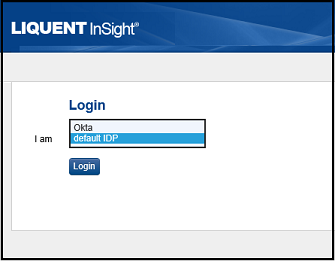
  2. In the I am field, select the required Identity Provider.
    • Default IDP: the IdP label configured for the IdP in the configuration (.var) file
    • Okta: the active IdP label or name configured in the Security Admininstration section of Calyx RIM
      Note: Please note that the IdP labels shown in the image (Default IDP and Okta) are for example only. Options and naming convention may differ based on the IdP configured in your .var file and Security Administration.
  3. Click Login.
    The selected IdP login page appears.
  4. In the Username field, enter your user name.
  5. In the Password field, enter your password.
    If you do not know your user name or password, contact your system administrator.