Calyx RIM Database Migration Path
Perform the migration steps to migrate your data from the previous versions of Calyx RIM.
The order in which the migration scripts should be run is indicated by the name of the individual ZIP files containing the database scripts. Please refer to the respective release notes for each database migration script.
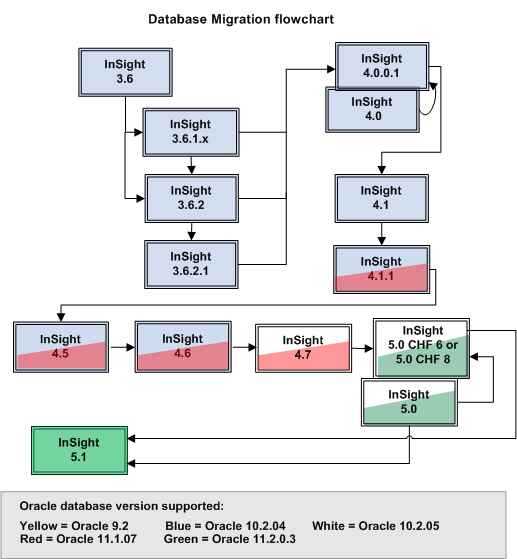
- Follow the database migration path from Calyx RIM 4.7 to the database migration for Calyx RIM 5.0.
- The upgrade to Calyx RIM 5.1 can only be done from the Calyx RIM 5.0 base installation, or from Calyx RIM 5.0 Certified Hotfix (CHF) 6. Follow the database migration path from your current version to Calyx RIM 5.0, 5.0 CHF 6, or 5.0 CHF 8 before proceeding to the database migration for Calyx RIM 5.1.
- The upgrade to
Calyx RIM 6.0 can only be done from
Calyx RIM 5.1 CHF 2 and later. Follow the database migration path from your current version to
Calyx RIM 5.1 CHF 2 and later before proceeding to the database migration for
Calyx RIM 6.0, and then to
Calyx RIM 6.0 CHF 2.
Note: To migrate to Calyx RIM 6.0 from Calyx RIM 5.1 CHF 2 and later 5.1 CHFs, use DB Upgrade 51 CHF2 to 60.zip.
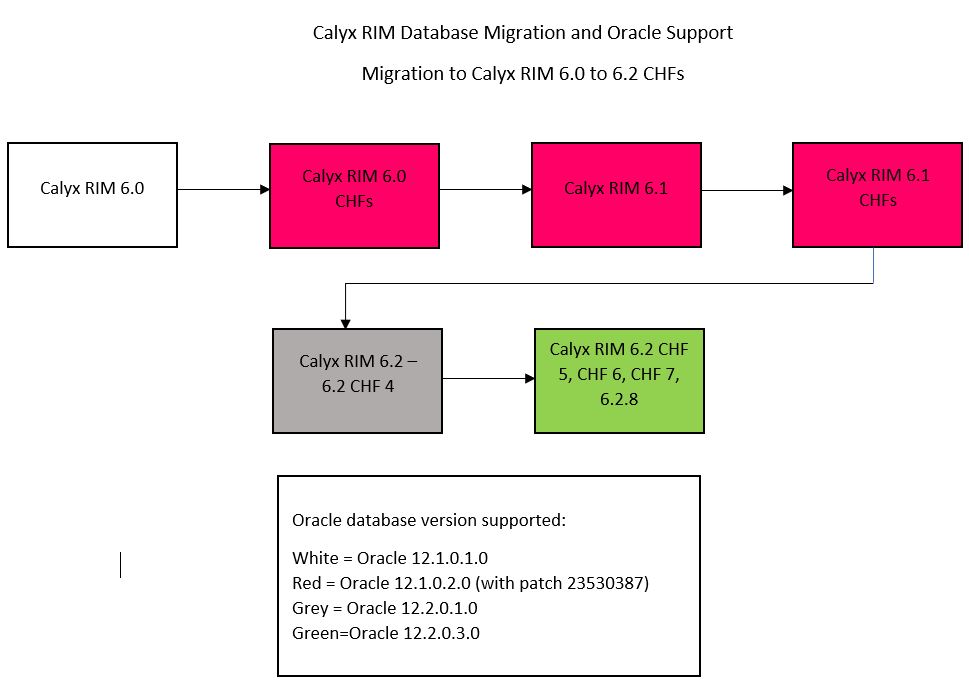
- The upgrade to any Calyx RIM 6.0 CHF can only be done from Calyx RIM 6.0 or previous 6.0 CHFs. Follow the database migration path from your current version to Calyx RIM 6.0 before proceeding to the database migration for Calyx RIM 6.0 CHFs.
- The upgrade to any Calyx RIM 6.1 CHF can only be done from Calyx RIM 6.1 or previous 6.1 CHFs. Follow the database migration path from your current version to Calyx RIM 6.1 before proceeding to the database migration for Calyx RIM 6.1 CHFs.
- The upgrade to Calyx RIM 6.2 can only be done from Calyx RIM 6.1 CHF 4 and later CHFs. Follow the database migration path from your current version to Calyx RIM 6.1 CHFs before proceeding to the database migration for Calyx RIM 6.2.
- The upgrade to any Calyx RIM 6.2 CHF can only be done from Calyx RIM 6.2. Follow the database migration path from your current version to Calyx RIM 6.1 CHFs before proceeding to the database migration for Calyx RIM 6.2 CHFs.
Migration and Saved Public and Private Queries
When migrating from a previous version of Calyx RIM to a newer, major version of the product, your saved Public and Private queries will not be saved. After your migration is completed, if an error appears when running a query saved in your previous version, use the selected values on the query page to create a new saved query.
Database Migration Path
The following flowcharts illustrate the database migration path for Calyx RIM and the supported Oracle database version for each Calyx RIM version.
Database Migration from Calyx RIM 6.0 to the current Calyx RIM version:
Database Migration from Calyx RIM 3.6 to Calyx RIM 5.1: