Overlay Template File
Calyx RIM enables you to merge two PDF files so you can customize documents with headers and footers or apply a watermark.
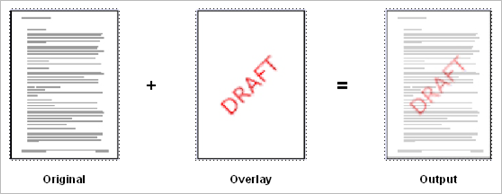
You can apply different overlay templates to cover pages, TOCs, and documents in a submission. This effect is similar to that of a commonly used technique using transparencies and paper originals. The overlay information is printed onto a transparency, the transparency is placed onto a photocopier, and another document is placed on top of the transparency with the output being a merger of the two documents:
- Paper
- Electronic
- Variables that contain other variables
- Variables that contain formatting for other variables
- Data administration variables
- System-defined
- Calyx RIM
- Repository
- User-defined
You can create overlays in any document format that can be subsequently converted to PDF. Overlay files usually contain a single page, but you can define additional pages with an alternative page size or orientation that Calyx RIM can apply when source pages have different sizes. For examples of overlay files, refer to the samples provided for you in the installation files.
Variable Code and Delimiters
- <Left_Aligned >
- < Right_Aligned>
- < Centered >
The fonts used for variables in Overlay Templates must be installed on all Calyx RIM Rendering servers used to publish output with these overlays.
In addition to size and alignment, the delimiters and variable code specify the font, point size, and formatting of the text. In order to be correctly recognized and formatted, the delimiters and variable code must all share the same font, point size, and formatting.
Less-Than Sign (<) and Greater-Than Sign (>)
In an overlay template, do not use the less-than sign or the greater-than sign, except to enclose variables. Using these characters for any other purpose can cause undesired results.
Japanese Characters
The font of the delimiters and variable code also determines which characters can be stamped. Most fonts do not contain all Unicode characters. If you intend to include Japanese characters in variable resolutions for example, you must make sure the font used for the delimiters and variable codes is MSMincho or another font containing Japanese characters. Arial Unicode MS is one of the few fonts containing almost all Unicode characters.
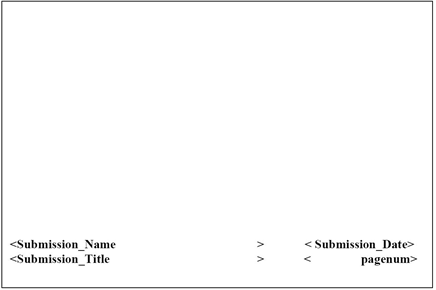
Overlay Footer Example
In this sample, the variables Submission_Name and Submission_Title are left aligned, and the variables Submission_Date and pagenum are right aligned. These variables are not predefined system variables, so you must define them at the assembly level or they must be defined by an administrator in data administration user-defined variables.
Portrait Overlay Footer