Calyx RIM 6.2 CHF 4 Release Notes
This document describes a certified hotfix (CHF) provided to improve Calyx RIM 6.2. In addition to enhanced features and functionality, Calyx RIM 6.2 CHF 4 resolves issues that were reported to Technical Support. Our hotfixes are cumulative packages applied to a named version of our software.
As a certified hotfix, these updates have undergone Quality Control regression testing, certifying the system works as expected. These changes will not create a new code branch, but will be identified by the updated build number on the existing codeline of each version affected, not a new release number.
Upgrade Guidelines
The new Calyx RIM 6.2 CHF 4 Upgrade Guidelines describes the upgrade process and provides links to necessary documents for performing your upgrade installation. See: Calyx RIM 6.2 CHF 4 Upgrade Guidelines in the Calyx RIM online help.
Overrides Updates
Calyx RIM 6.2 CHF 4 requires overrides updates. Please allow 6 to 8 weeks for XML overrides review and updates. For details, please contact your Business Development Representative to consult with our Client Enablement team.
Regulatory Updates
Calyx RIM 6.2 CHF 4 includes functionality related to the following regulatory updates for preview and preparation purposes:- China (CN) eCTD Module 1 version 1.0 (draft, dated 17 September 2019)
- Eurasian Economic Union (EAEU) electronic submission format version 1.0. The following features are included as part of this support:
- EAEU template
- Create eCTD wizard
- Lifecycle operations
- Publishing of the output with the resulting xml being separate from the content files
- eCTD import of EAEU submissions is not part of the scope
Non-eCTD Assembly Templates
- Traditional and Abbreviated 510(k)s
- Original Pre-Market Application
- MD - IMDRF (HC) IVD Template
- MD - IMDRF nIVD Template
Data Administration
To maintain the submission product types of China region, the Submission Product Type Values table has been introduced.Data Administration Table Enhancements
- ATC Values
- Compendial Designation/Source Values
- Concentration Measure Type Values
- Country Values
- Denominator Unit Values
- Numerator Unit Values
- Dosage/Pharmaceutical Form Values
- EMA Authorisation Status Values
- Language Values
- Legal Basis Values
- Medical Device Values
- Medicinal Product Type Values
- Procedure Type Values
- Route of Administration Values
- Unit of Measure Prefix Values
DMS Support Enhancements
Calyx RIM 6.2 CHF 4 enables you to configure a field of comma-separated values to be used as search criteria in DMS Search, for Documentum only. Such configuration may be applied to most of the text-like document attributes in for Documentum. Please contact your Business Development Representative to consult with our Client Enablement team.
Veeva Integration Improvements
- API calls consumption has been significantly reduced for the following operations:
- Browsing Veeva repository from DMS Browse
- Searching documents in Veeva repository using DMS Search
- Assignment of a Veeva section from Veeva native UI or DMS Browse/Search
- Two timeout values have been added to insight.var for connections to the Veeva DMS.
- Support for Veeva users configured for SSO authentication has been added.
- Renditions processing has been enhanced.
Show/Hide Product Family
It is now possible to hide specific product families from being displayed in the Product Family navigation tree. To show or hide product families, use the new option Show in Tree on the Modify Product Family page.
Workflows
Calyx RIM6.2 CHF 4 provides the following enhancements to the Workflows functionality:- A link to a specific Activity is sent in e-mail.
- A link to a specific Workflow is sent in e-mail.
- Emails and scheduling are set via the Calyx RIM configuration file.
- A chain of Activities, which covers the XEVMPD XML creation flow for particular Full Product Presentation. See: Configure Workflows to Create an XEVMPD XML File in the Calyx RIM Workflows online help.
- Options for Workflow Activities to update XEVMPD related fields on selected entities assigned under the same application, in bulk. See: Configure Workflows to XEVMPD Bulk Update in the Calyx RIM Workflows online help.
XEVMPD
The performance of the XEVMPD Submission Wizard has been improved in this release.
In the XEVMPD Submission Wizard, the Authorised Product section error messages have been revised for better understanding of the errors. The wording for some messages has been updated and one new topic for Authorized Product section has been added: XEVMPD Error Messages for Authorised Product
Queries
- Change
- Change Details
- Event Change Details
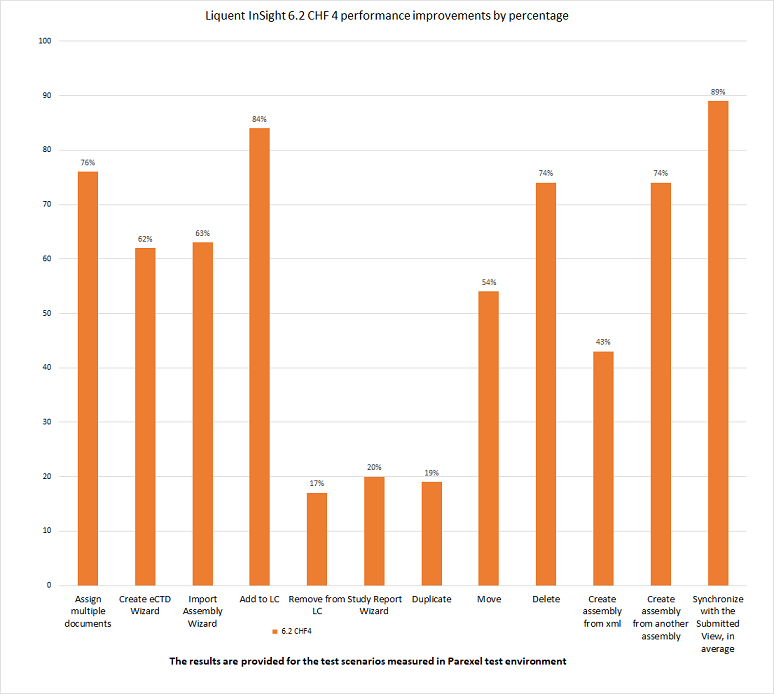
Assembly Enhancements
- Assign multiple documents
- Create eCTD wizard
- Import assembly using Import Assembly wizard
- Add to lifecycle/remove from lifecycle
- Study Report wizard
- Duplicate
- Move
- Delete
- Create assembly from xml
- Create assembly from another assembly
- Synchronize with the Submitted view
Link Inspector
Calyx RIM 6.2 CHF 4 increases speed for the following types of links when refreshing the Link Inspector:- External links in documents when source and target are within the same tree
- Internal links in documents
- In-Process links in documents
Mass Update Properties
Calyx RIM6.2 CHF 4 provides the ability to set extensions or extension attributes for folders and leafs using the Mass Update Properties feature.
Leaf Attributes Mapping
Calyx RIM6.2 CHF 4 provides the ability to configure mapping of leaf attributes to document attributes for the auto-created leafs. This configuration needs to be done in propertyMappings.xml file. By default, this release has the same configuration as previous releases. If you wish to change the default mapping, please consult with our Client Enablement team.
Usability Enhancements
- Ability to list comma-separated values in DMS Search for Documentum
- Warning message with hyperlinks in a new working assembly being created under an application with unlifecycled working assemblies
- XML Definitions field added on the Publish Request window
- Improved formatting of Job Requests messages
User Session Limits
Calyx RIM 6.2 enables a user with administrative permissions to set up the user session limit in the insightConfig.bat file. By default, this ability prohibits the same user from logging on from multiple locations at the same time. See: Authentication for Identity Providers (IdP) in the Calyx RIM Administration online help.