Perform the steps below to configure auto-generated emails.
-
Stop the Apache Tomcat service(s).
-
Locate the
mailconfig.properties file.
For Tomcat, you can find the
mailconfig.properties file in the
\I4V\WEB-INF\config subfolder of your Tomcat installation directory.
-
Open the
mailconfig.properties file in a text or XML editor.
-
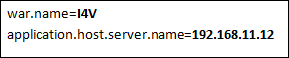
Specify the values against the properties as required.
-
Save and close the file.
-
Start Apache Tomcat service(s).