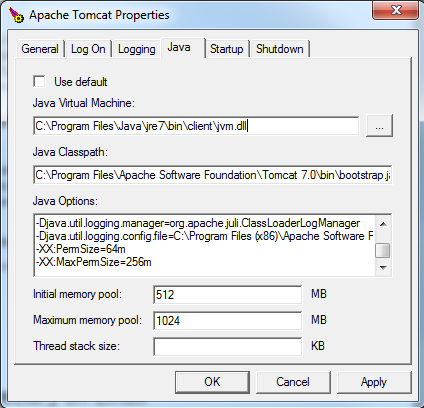
Setting the JVM Permanent Generation Space and Apache Tomcat Memory Pool Values
Launch the
tomcat<version>w.exe file.
You can find the
tomcat<version>w.exe file in the bin folder of your Tomcat installation directory. In a typical (default) installation you can find this folder at
C:\Program Files\Apache Software Foundation\Tomcat<version>\bin, where
<version> indicates the version of Apache Tomcat.
In the Apache Tomcat
Properties window, select the
Java tab.
Under
Java Options, enter the following lines at the end of the other options:
-XX:PermSize=64m
-XX:MaxPermSize=256m
In the
Initial memory pool field, set a minimum value of
512 MB.
In the
Maximum memory pool field, set a minimum value of
1024 MB.