Use
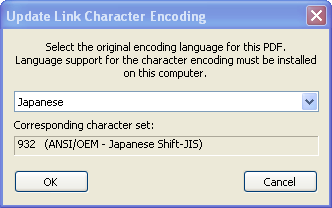
Update Link Character Encoding to modify the selected character set.
To update link character encoding:
-
Open the source PDF in Acrobat.
-
In the
SmartLink for PDF menu, select
Update Link Character Encoding.
-
Select the original encoding language used in the document.
-
To set the selected character set for the encoding update, click
OK.
-
To end the procedure without changing character encoding, click
Cancel.
-
Click
Yes to confirm the update for the document using the selected character set.,.
When the update is finished,
SmartLink for PDF displays this message:
The links have been correctly updated.
-
Click
OK to close the message.
-
Save .
If the source PDF resides in a DMS, you must check-in the updated source PDF.