Open Liquent SmartLink for PDF
Use Liquent SmartLink for PDF to create, modify, and remove hyperlinks in PDF documents.
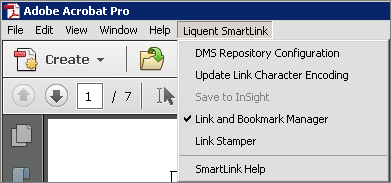
Liquent SmartLink for PDF options are available on the Acrobat menu, icons that appear on the Advanced Editing toolbar, and in the Tools pane. All three methods provide access to the same SmartLink for PDF functions:
- DMS Repository Configuration.
- Update Link Character Encoding.
- Save to InSight (available only for interface with InSight Publisher.)
- Link and Bookmark Manager.
- Link Stamper.


To display SmartLink by default:
- Click the Tool tab and scroll to the bottom of the list.
- Click the Add button under the Liquent SmartLink instance. The Liquent SmartLink icon will be added to the Tools pane.