Modify the CSV File
Use the CSV file using Microsoft Excel to add, modify, or remove bookmarks and hyperlinks.
To use the CSV file:
Do one of the following:
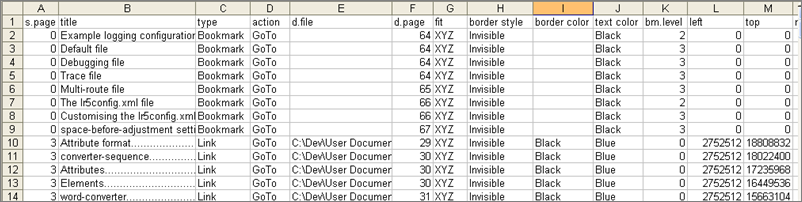
| Option | Action |
|---|---|
| To add a bookmark or hyperlink: | To insert a row in the Excel table and defining the necessary properties. |
| To modify a bookmark or hyperlink: | Edit the attribute values in an existing row in the Excel table. |
| To delete a bookmark or hyperlink: | Remove the row from the Excel table. |
- Add a bookmark or hyperlink by inserting a row in the Excel table and defining the necessary properties.
- Modify a bookmark or hyperlink by editing the attribute values in an existing row in the Excel table.
- Delete a bookmark or hyperlink by removing the row from the Excel table.
Note: Do not edit bookmarks for
InSight in-process PDFs. You cannot edit the contents of an in-process rendition.