Hide Columns To hide a column, hover your pointer over any column header and click the menu arrow that appears to the right of the header. On the pop-up menu, hover your pointer over Columns to see the list of columns available for the table. Select or clear the check boxes to show or hide columns. Selected columns are shown, cleared columns are hidden. Related informationSort ColumnsHomeTablesHide Columns
Hide Columns To hide a column, hover your pointer over any column header and click the menu arrow that appears to the right of the header. On the pop-up menu, hover your pointer over Columns to see the list of columns available for the table. Select or clear the check boxes to show or hide columns. Selected columns are shown, cleared columns are hidden. Related informationSort ColumnsHomeTablesHide Columns
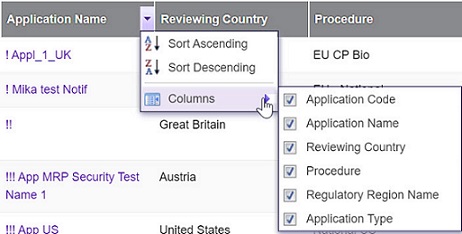 Selected columns are shown, cleared columns are hidden.