Analytics Tree on the Home Page
On the Home Page navigation pane, the Analytics tree provides access to the Reports, My Reports, and Favorites folders.
To view the Analytics tree, you must have the appropriate permissions set in the Calyx RIM system by your system administrator.
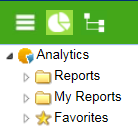
With the necessary security permissions, you can access Calyx RIM for Analytics reports in the following folders:
- Predefined Reports - When expanded, this node displays the reports that you are licensed to access. When you double-click a report, it opens in a separate window.
- My Reports - Contains ad hoc reports, which are created by using InfoAssist in the Analytics portal. When expanded, this node displays the MyContent folder, which is visible only to you, and Shared folder, which is visible to all users or some specific users. When you double-click a report, it opens in a separate window.
- Favorites - Contains reports (of any type) that you have saved as favorites in the Analytics portal. They are visible only to you. When you double-click a report, it opens in a separate window.
You can configure reports to run in the following output types:
- Bar Chart
- Column Chart
- Line Chart
- Heat Map
- Pie Chart
- Pivot Table (HTML Active)
The reports can include calculations, formatting of data, and nested queries to represent data in specific formats.
You can save a dashboard to either the My Reports folder or the My Content folder.