Tasks and Sub-tasks
You can use tasks for many different reasons in Calyx RIM. You can track requests, help users follow processes for getting things done, and set up reminders when performing planning and tracking activities. Tasks can identify correspondence response needs, periodic reporting requirements, data review, or maintenance requirements and other system needs.
- Product Families
- Products
- Applications
- Registrations
- Events
- Sequences
- References
- Projects
- Workflows
- Change
- Change Details
Sub-tasks are associated with tasks or sub-tasks. These allow major tasks to be divided into smaller, more manageable tasks.
Your data administrator may set up task statuses in such a way that they help users understand the progression that specific types of tasks may take. We refer to this as task status progression. When a task status progression has been set up, Calyx RIM lets you choose from the statuses that have been defined as appropriate when moving from the current status. The following illustrates an example of a task status progression named Marketing Approval Required.
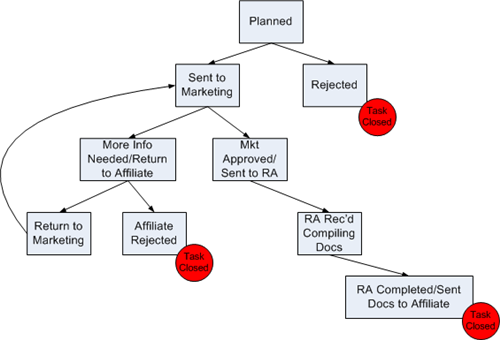
As this example illustrates, Calyx RIM displays only the statuses to which you can progress. For example, a task with a Planned status can progress only to the Send to Marketing status or to the Rejected status. These are the only statuses available when you modify the task status.
If your administrator has not set up a task status progression, you can choose from any of the available statuses when you modify the task.
- Registration planning and tracking (RPT)
- Submission planning and tracking (SPT)
For Tasks Statuses, the order of the statuses is determined by the actual date. In cases where more than one status has the same actual date, the statuses will be ordered based on the creation date of the status row. For example, if the task status 'Open' exists and then the statuses 'Archived' and 'Closed' are added in that order, they appear in that same order in the Status Date tab.