To use SharePoint as a DMS, your
Liquent InSight Rendering installation must be licensed for it, and you must install the Liquent SharePointServices installer on each SharePoint server.
You must set up DMS properties for each SharePoint repository server so that
InSight Rendering can communicate with the
Parexel SharePoint Web service installed on each SharePoint server.
To set SharePoint properties:
-
Select
SmartLink DMS Repository Configuration to open the
DMS Properties dialog box.
-
On the
SharePoint tab, do any of the following:
- To add a SharePoint server, click
Add.
- To modify a SharePoint server in the list, click the server and then click
Edit.
- To delete a SharePoint server in the list, click the server and then click
Remove.
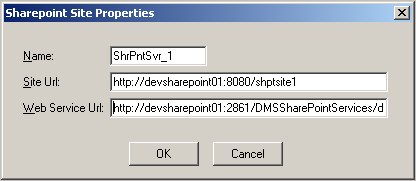
If you chose to add or edit a SharePoint server, the
SharePoint Site Properties dialog box appears.
-
In the
Name field, enter the name of the SharePoint site running on the SharePoint server.
-
In the
Site Url box, enter the URL for the server hosting the SharePoint repository. The format of the setting is
http://SharePoint Server Name:port/site name
.
The
port is required only for a port number other than 80.
-
In the
Web Service Url box, enter the URL for connecting with the SharePoint Web service installed on the SharePoint server.
The format of the setting is:
http://SharePoint Server NameWeb service port/DMSSharePointServices/dmssharepointservices.asmx
Port 2816 is the default port for the SharePoint Web service. The port can be configured differently on using the IIS Manager application on the SharePoint server.
Note: For
InSight users, ensure that the name and path information defined here matches what is defined in the
insight.var file on the
InSight application server.
-
To save the SharePoint site properties, click
OK.