Event-Country Status Rules
Because the event-country status is associated with an event, several conditions apply when the event-country status is changed using the Update Event Country Status wizard.
Rules for Planned Events
For events created by using a timeline/event plan, if an optional status was selected, the event country schedule is updated with the optional status and the status date you selected when using the wizard.
You can update an event-country status for a planned event that enforces status progression. For such an event:
- Only one primary status is available for you to select. This status is next in the sequence of primary statuses defined in the timeline/event plan. Optional statuses are also available for selection.
- The planned event also restricts the status date for an event country schedule. The date cannot be earlier than the preceding status in the progression.
Rules for Events and Associated Entities
If you selected a status of Approved, Not Approved, or Withdrawn (or statuses that map to those internal statuses) and the event is not closed:
If you selected
Approved,
Not Approved, or
Withdrawn (or a status that maps to those internal statuses) and the event is closed:
- Only the event country status and status dates for the selected countries will be updated.
- The status and status date do not change for the associated applications, PDSs, PDS details, and sequences.
- The associations closed status becomes the last status selected in the wizard for the event countries.
- The closed date becomes the status date selected in the wizard.
- Upon closing the event, associated entities are also affected, including the application, product detail set, and sequences.
- When an Event is closed as
Approved, meaning the
Associations Closed As field is set to
APPROVED, and the PDS associated to this Event has a withdrawn Country Detail, displayed as
Country (Pending Withdrawal), the
Country Status field of this country is automatically set to
Approved and this country is displayed as
Country (Withdrawn) in the PDS Tree on the left. As an additional rule, the parent
field is automatically updated to be equal to Today's Date. The same rule applies to the Application Country when the
Country (Pending Withdrawal) Detail is modified and the
Country Status field is set to
Approved. See the following flowchart diagram.
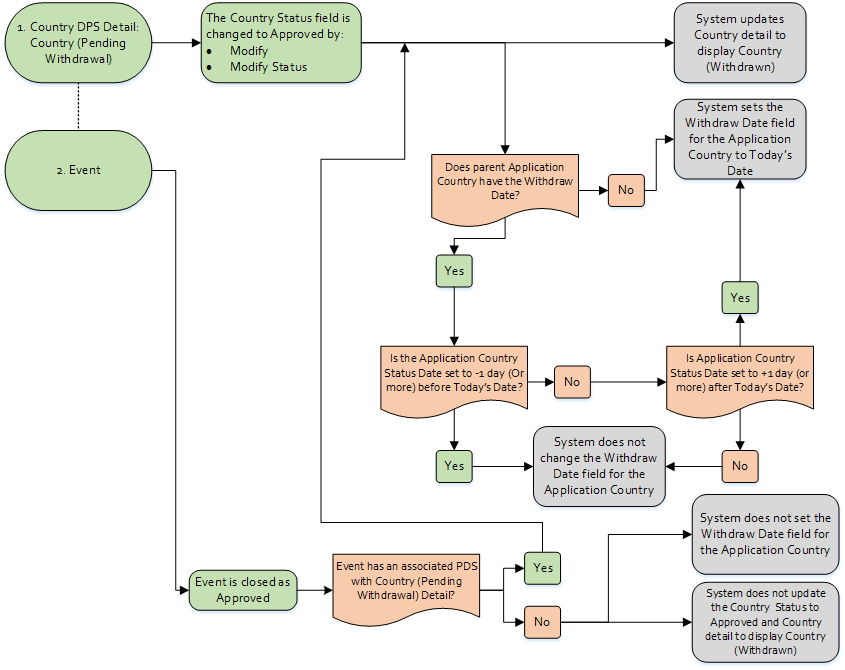 Note: The field is updated only if there is no withdraw date populated, or the withdraw date is set to +1 day (or more) after Today's Date.