Open Linking plug-in (PDF)
Use Linking plug-in (PDF) to create, modify, and remove hyperlinks in PDF documents.
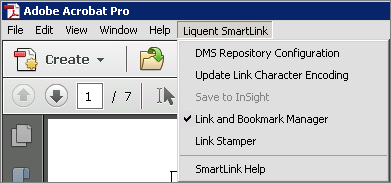
Linking plug-in (PDF) options are available on the Acrobat menu, icons that appear on the Advanced Editing toolbar, and in the Tools pane. All three methods provide access to the same Linking plug-in (PDF) functions:
- DMS Repository Configuration.
- Update Link Character Encoding.
- Save to InSight (available only for interface with Calyx RIM Publisher.)
- Link and Bookmark Manager.
- Link Stamper.

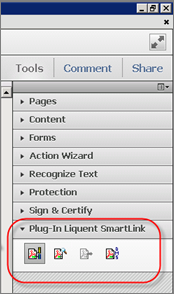
To display SmartLink by default:
- Click the Tool tab and scroll to the bottom of the list.
- Click the Add button under the Liquent SmartLink instance. The Liquent SmartLink icon will be added to the Tools pane.