Create an Internal Link

Use Link Stamper to reference a page in the same document.

An internal link is a hyperlink that targets a page in the same PDF document.
To target a page:
  1. Open Link Stamper and then click-and-drag the pointer to create a bounding box around the text that will include the hyperlink.
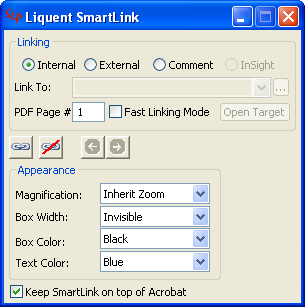
  2. In the Link Stamper dialog box, do the following:
    1. Select Internal.
    2. In the PDF Page # box, enter the target page in this PDF document.
    3. Under Appearance, specify the attributes for the magnification, text color and bounding box.
    4. Click the Link button to create an internal hyperlink with the attributes you defined.
  3. Repeat these steps for as many internal links as you need to create.
    The Link Stamper dialog box preserves the previously defined settings so that you can create multiple links with minimal or no changes.
  4. To save your hyperlinks to the PDF, click File > Save in Acrobat.