Search Options
In conjunction with using the Find What box in SmartLink for Word to locate words or phrases in documents, you can use the advanced search features in the Options list to customize and refine your searches.
In the
LIQUENT SmartLink for Word dialog box, click
Options and select
Show Find Options.
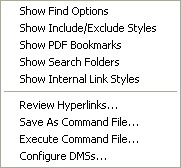
The selected advanced search options will appear at the bottom of the window.