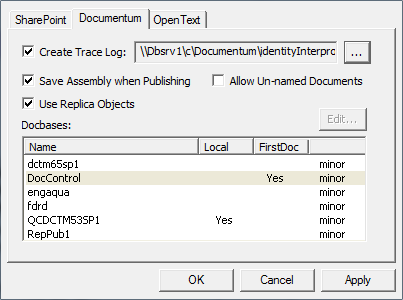
DMS Properties: Documentum
To access a Documentum system, you must have established a
Windows Domain property on the
User's Info page in the
Documentum Administrator. You must be able to log on to your Documentum system to complete this procedure.
-
In
SmartLink for Word, open the DMS Properties
Documentum tab, select a Docbase in the list and choose among the following properties:
- Create Trace Log (browse to locate the trace log in your system)
- Save Assembly when Publishing
- Use Replica Objects
- Allow Unnamed Documents