Modify Lead Times for Timeline/Event Plan Countries

You can modify the number of days that represent the lead time for an event status for a country. Country lead times are not defined for optional event statuses.
To modify lead times for countries in a timeline/event plan:
  1. In Calyx RIM, click Go To > Data Administration.
  2. On the Data Administration page, under Event Maintenance, click Timeline/Event Plan Values.
  3. On the Timeline/Event Plan page, click the link for the timeline/event plan whose country event status you wish to modify.
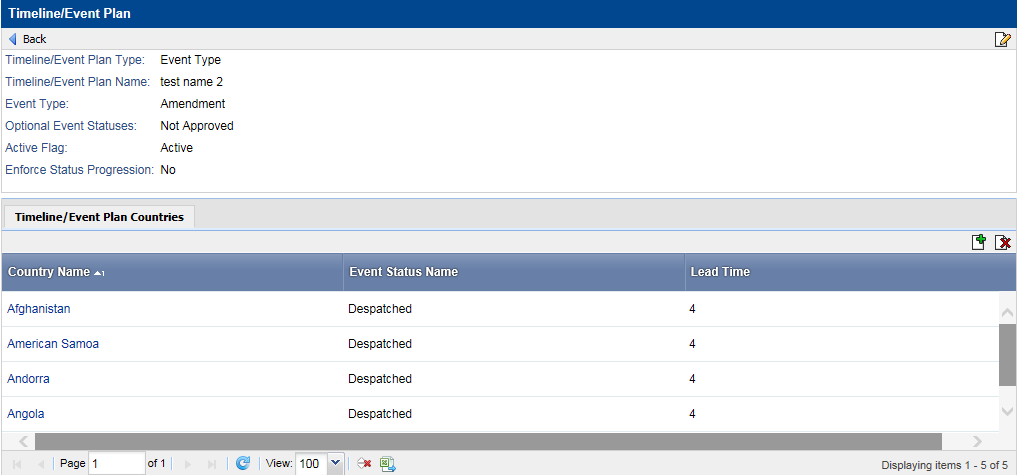
  4. In the Timeline/Event Plan Countries table, click the appropriate country link for the event status that you want to modify for that country.
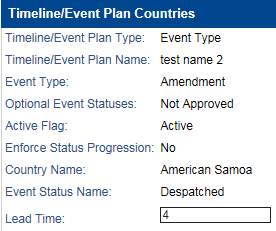
  5. In the Lead Time box, enter the number of days lead time for the country and event status.
  6. Click Save.
    The modified lead time value for the country and event status appears on the Timeline/Event Plan Countries tab.